How to Write a Commercial Treatment, With a Free Template and Example

A commercial treatment is the document a director sends an agency to win an ad: 10 to 15 slides that tell the story beat by beat and show how the film will look, sound and be shot. Below is a filled-in treatment for a 30-second spot, with its storyboard frames, and a free template you can edit in PowerPoint, Keynote or Google Slides.
Further down: what changes in a director's treatment, how the treatment becomes a storyboard your client can comment on, and how to write a film or documentary treatment, a logline and a synopsis.
Free Commercial Treatment Template
13 editable slides: the idea, director’s note, story beats with frames, look, casting, sound, formats, shoot plan and sign-off.

What is a commercial treatment?
A commercial treatment, also called a director's treatment or creative treatment, is how a director pitches for an ad. The agency has already written the script. Several directors each send a treatment saying how they'd make it, and the agency and brand pick one.
It sits between the script and the storyboard. Once a director is chosen, the treatment's story beats become the storyboard, and the look and casting pages become the brief for the crew.
| Document | Length | Who writes it | What it's for |
|---|---|---|---|
| Logline | One sentence | The writer | The idea, for anyone deciding whether to read on |
| Synopsis | One page | The writer | The whole story in prose |
| Film treatment | 5 to 20 pages | The writer | Pitching a film or series before the screenplay |
| Commercial treatment | 10 to 15 slides | The director | Winning an ad the agency has already written |
| Storyboard | One frame per shot | Director and artist | Getting the shots approved before the shoot |
Commercial treatment example: "Left on the worktop"
This is a full director's treatment for a 30-second ad, with the storyboard frames inline. Alder, the agency Beacon Ads and the production company Northlight Films are made up. They come from the demo storyboard every new Boords account starts with, so you can open the same board in a free account.
Sample Commercial Treatment (PowerPoint)
The full 15-slide Alder treatment below, with the storyboard frames inline. Edit it, or copy its structure.

The idea
One bottle of Alder hand lotion goes missing for a day, because everyone who finds it wants some. The film is a relay. The bottle leaves Sarah's kitchen in the morning, crosses town in a coat pocket and works its way down an office row. It's still being borrowed when she rings to ask for it back. End line: "Alder. Good enough to go missing."
Director's note
"I love this script because nobody says the product is good. Everyone just keeps taking it. That's the proof, and my job is to keep it that small. I'll play it straight: no mugging to camera, no comedy stings. The bottle is the lead. It's the brightest thing in every frame, and it travels left to right through the whole film, so you can follow it with the sound off."
The story
Each slide is one beat, with two storyboard frames, what we see, and what we hear.


Look, casting and sound
- Light: always from a window. Warm and low in the morning, flat and cool by late afternoon, so the empty box feels like the end of the day.
- Camera: locked-off frames and slow pushes. The camera never chases the bottle.
- Palette: oatmeal, sage and soft grey, so the white bottle is the brightest thing in shot.
- Casting: Sarah (50s) is dry and unflappable. Alex (30s) shares her kitchen; the pair with the best chemistry gets the part, and the agency picks the relationship. Leo's chair roll is the biggest laugh, so he's cast for timing. A hand double does the pump inserts.
- Sound: plucked double bass and brushed snare. The music drops out on the empty box and comes back on the pump click. Five VO lines, 35 words.
Formats, shoot plan and sign-off
| Version | Length | Aspect ratio | How it's cut |
|---|---|---|---|
| Hero | 30s | 16:9 | The whole relay, frames 1 to 11 |
| Cutdown | 15s | 16:9 and 9:16 | Morning, the office, the call, packshot |
| Bumper | 6s | 16:9 | Empty box, "Where's my hand cream?", end line |
Two shoot days: the house on day 1, with the packshot and the product team on set, and the office on day 2. The treatment is signed off by the agency's creative director and the brand manager in week 1. The storyboard follows in week 2, the animatic in week 3 and the pre-production meeting in week 4.
Why it works: every slide answers a question the agency will be asked by its client. What will it look like? Who's in it? How do we get the 15s and the 6s? Who signs it off? A treatment that only sells the mood leaves those to the call.
Commercial treatment template: what to include
Our template has a slide for each of these, with prompts in brackets to type over.
| Slide | What to put on it |
|---|---|
| Cover | Brand, spot title, lengths and formats, director, production company, version. |
| The idea | The film in one sentence, then one paragraph on how it pays off. |
| Director's note | First person, under 150 words: why this script, and what you'll do with it. |
| The story | One slide per beat. Two frames each, what we see, and what we hear. |
| Look and tone | Light, camera, palette and design, with a credited reference image. |
| Casting | Each role: age range, what they're like, what you're casting for. |
| Sound and music | Track or brief, effects, VO, and how it works with the sound off. |
| Formats and cutdowns | Every version by length, aspect ratio and channel, and how you'll cut it. |
| Production approach | Shoot days, locations, product handling and risks, with the plan B. |
| Sign-off and next steps | Who approves the treatment, storyboard and animatic, and by when. |
The last two are the ones most treatments leave out, and the ones a producer reads first.
How to write a commercial treatment
- Read the script and the brief twice. Note what the agency has fixed (end line, mandatories, product shots) and what's left open to you.
- Get on a call with the agency creatives. Ask what they'd hate to see. Their answer is more useful than any reference.
- Write the idea in one sentence. If you can't, you don't have your take on the script yet.
- Break the script into beats. Five to seven for a 30s. Write each in the present tense: what we see, then what we hear.
- Add frames. Rough sketches, AI frames or stills from a storyboard all work. Frames show the shot sizes and the bottle's route through the film faster than paragraphs.
- Plan the cutdowns now. Say how the 15s and 6s come out of the shoot, and protect a 9:16 safe area if there's a vertical version.
- Add the production approach and the sign-off plan. Days, locations, risks and named approvers. This is where producers compare treatments.
- Get feedback before it goes out. Send it to your producer and one person who hasn't read the script. If they can't retell the story, cut words.
Director's treatment: what changes
A director's treatment is the same document seen from the other side. The commercial treatment above is a director's treatment for an ad. Directors also write them for music videos, branded content and short-form series, and the structure holds:
- Write in the first person. "I'll shoot it locked off" reads like a director with a plan. "The film will be shot locked off" reads like a template.
- Lead with your take, not a summary. The agency knows the script. They want to know what you'd do with it that the next director wouldn't.
- Use your own frames where you can. Reference images from other people's work are standard, but credit them. Frames boarded for this script show you've already started.
- Keep it short. An agency producer may read six treatments for one script. Ten tight slides beat thirty beautiful ones.
Our template works as a director's treatment template for any of these. Delete the formats slide for a music video and the casting slide if there's no cast.
From treatment to storyboard and client review in Boords
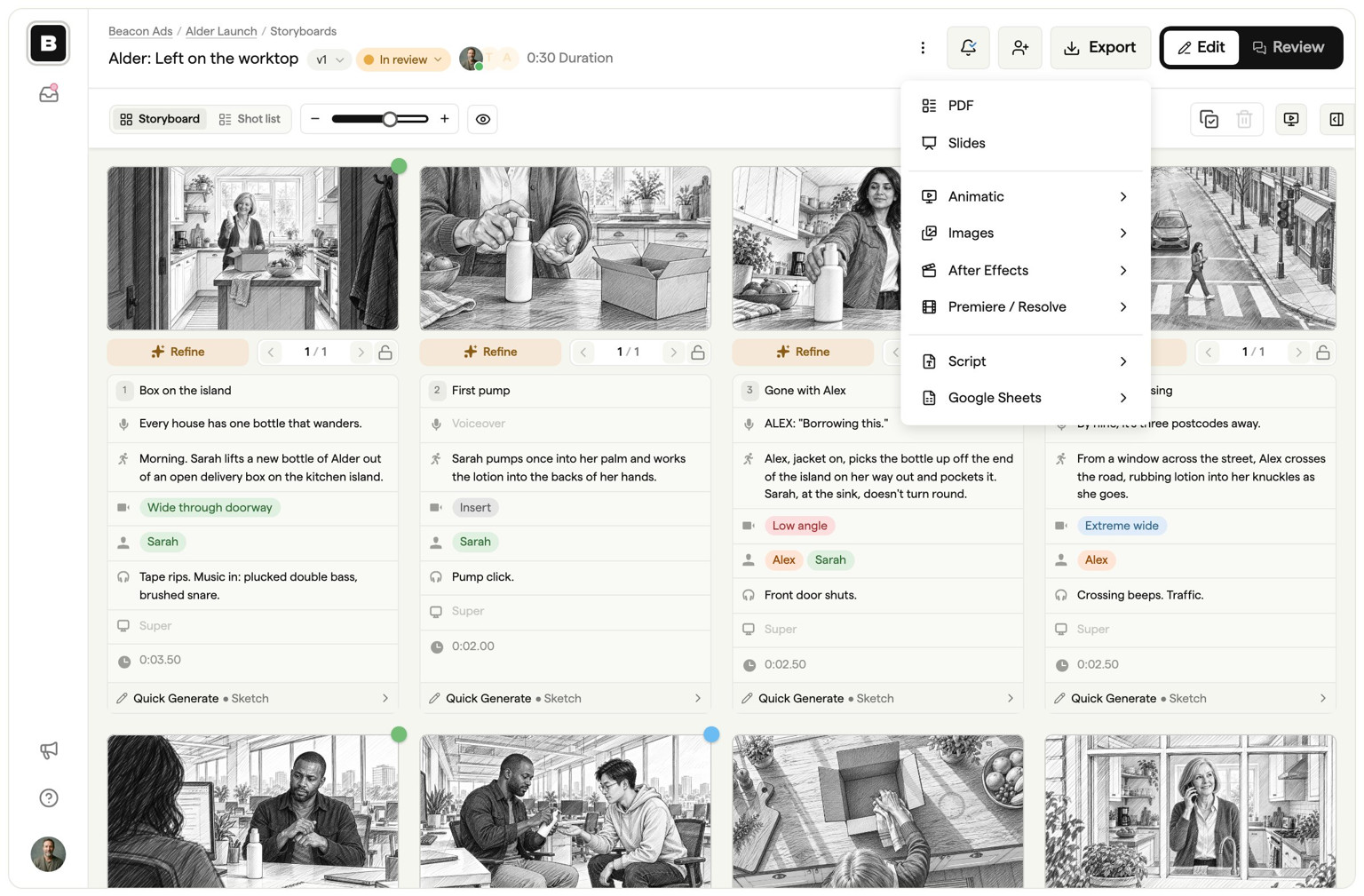
Once the treatment wins the job, its story slides become the storyboard and the agency's client starts reviewing. In Boords, keep one project per job, so the storyboard, the script and every round of comments sit in one place. Boords for preproduction shows the whole flow.
Add your producer to the team
- Open the team menu and click Invite members. Or, inside the job's project, click Share, then Invite to edit. Only owners and admins see these options.
- Type the producer's email into Invite by email, choose a role and click Invite.
- Full access lets them edit every project. On Team and Agency, Restricted limits a freelancer to the projects you assign.
Each teammate takes a seat. Your client never does. See inviting and managing users.
Turn the story beats into a storyboard
In the project, click New and choose Storyboard. Add a frame for each shot in your story slides and paste the beat text into the frame fields. If the agency's script is already in Script Editor, click Storyboard in the script header, then Create storyboard, and Boords builds one frame per scene. More in creating storyboards and script to storyboard.
Export the storyboard as an editable PowerPoint
- Open the storyboard and click Export, then Slides.
- Choose PowerPoint, pick a layout, and click Export PowerPoint.
- Click Download PowerPoint. Frame text arrives as real text boxes, and the deck opens in PowerPoint, Keynote and Google Slides, so you can drop the frames into your treatment.

Here's the PowerPoint Boords exported for the Alder storyboard (3 MB). Editable PowerPoint export is on paid plans. On Free and during a trial, Slides exports watermarked images instead. See export formats.
Get the client commenting
- Open the storyboard and click Share storyboard in the header (owners and admins), or switch the Edit / Review toggle to Review and open the share settings.
- On the Review link tab, check that Allow comments is on. It's on by default for new storyboards.
- Copy the link, or type your client's email into Add reviewer emails and click Send. Sending from Boords shows you when they open it in the Activity tab.
- Your client opens the link, enters their name and comments on the frames. They don't need an account, they don't take a seat, and it works on every plan, Free included.
- When the notes are dealt with, someone on your team moves the storyboard to Approved.
See sharing links and commenting, or client review in Boords for an overview.
Run the job from treatment to signed-off storyboard
Team gives you 10 seats, editable PowerPoint export and team-only comments your client never sees. Guest reviewers never take a seat. $125 a month, or $85 a month billed yearly.
What is a film treatment?
A film treatment is a prose summary of a film or series, written before the screenplay. It covers the main characters, the key scenes and the turning points, in the present tense, so a producer or development executive can judge the story without reading a script. Writers use it to pitch, and to test the story before committing to a draft.
The difference from a commercial treatment is who's selling what. A film treatment sells a story the writer hasn't scripted yet. A commercial treatment sells a director's take on a script that already exists.
How long should a film treatment be?
There's no fixed length. Most film treatments run 5 to 20 pages, and ten is a sensible default if you don't know who'll read it. If you're writing for a particular reader at a production company, screenwriter John August suggests asking them what they expect. Some writers go much longer: James Cameron's treatments ran to 70 pages or more.
For comparison, a commercial treatment is 10 to 15 slides, and a documentary treatment is usually 2 to 10 pages.
What should you include in a film treatment?
Write it like a present-tense short story, with the subplots cut. Include:
- Title, with your name and contact details.
- Logline: the story in one sentence.
- Act one: the world, the main characters, what they want, and the event that starts the story.
- Act two: what pushes the characters to change, and the conflict that builds.
- Act three: the climax and how the story resolves.
- Ending: where we leave the characters.
Introduce each main character in capitals the first time they appear, and only describe what we'd see and hear on screen.
How to write a logline
A logline is one sentence that tells someone what your story is about and makes them want to read it. Treatments, synopses and pitch decks all start with one. In advertising, the "idea" slide of a commercial treatment does the same job.
A simple formula: When [inciting incident], a [main character] must [goal] before [stakes or antagonist]. Keep it under 30 words, name the character by what they are, not their name, and leave out the ending.
- The Godfather: The ageing patriarch of an organized crime dynasty transfers control of his clandestine empire to his reluctant son.
- Jurassic Park: During a preview tour, a theme park suffers a major power breakdown that allows its cloned dinosaur exhibits to run amok.
- Alder, from the example above: One bottle of hand lotion goes missing for a day, because everyone who finds it wants some.
How to write a synopsis
A synopsis is a one-page summary of the whole story, ending included. It's shorter than a treatment and longer than a logline, and it's often the first thing a reader asks for.
- Header: title, the word "Synopsis", genre, and your contact details.
- Logline: one sentence before the first paragraph.
- Characters and setting: one paragraph on who, where and when.
- Act one, two and three: a paragraph or two each. Don't hide the ending.
Write it in the present tense and the third person, and name only the characters who drive the story.
Documentary treatments
A documentary treatment describes a film you haven't shot yet, so it deals in intentions rather than plot. Funders, broadcasters and contributors read it to decide whether to back the film or take part. Commissioned documentaries and brand documentaries often need one before the budget is signed off.
Include the working title, a logline, the subject and why it matters now, the main contributors and your access to them, how the story is likely to unfold, the visual approach (observational, interviews, archive, reconstruction), and the production plan. Expect to rewrite it as filming changes the story. Keep the present tense and plain language, and describe only what the camera will see and hear. For the script stage, use our documentary script template.
Film treatment examples
Published treatments are rare. These three from working writers and directors are worth reading:
- The Circle, a TV series treatment by John August
- Spider-Man, an unmade film by James Cameron
- The Terminator, by James Cameron
For commercials, the Alder treatment above is a complete example you can download and edit.
Film Treatment Template for Microsoft Word
Writing a film or series treatment rather than an ad? Our Word template has headings for the title, logline, three acts and ending.
Microsoft Word Film Treatment Template
Headings for the title, logline, three acts and ending, to summarize your next film or series.

Frequently asked questions
What is a commercial treatment used for?
Directors use it to pitch an agency for an ad. It tells the story beat by beat and sets out the look, casting, sound, formats and shoot plan, usually in 10 to 15 slides with frames or reference images.
What's the difference between a director's treatment and a film treatment?
A director's treatment pitches how a director would shoot a script someone else wrote, usually an ad or music video. A film treatment is a writer's prose summary of a story, used to pitch a film or series before the screenplay exists.
How long should a commercial treatment be?
10 to 15 slides for a 30-second spot is typical. One slide per story beat, then look, casting, sound, formats and the shoot plan. Agencies read several treatments for the same script, so shorter wins over thorough.
Who writes a commercial treatment?
The director, with help from the production company's producer on the shoot plan and budget notes. Treatment writers and designers help directors on bigger pitches. The agency writes the script the treatment responds to.
What is a creative treatment?
A creative treatment is another name for a treatment: a short document that sets out the idea, story and look of a video before it's made. In advertising it usually means the director's treatment for a spot.
Can I make a treatment in PowerPoint or Google Slides?
Yes. Our template is a PowerPoint file that also opens in Keynote and Google Slides. If your storyboard is in Boords, paid plans can export it as an editable PowerPoint and you can drop those slides into the treatment.
Free Commercial Treatment Template
13 editable slides: the idea, director’s note, story beats with frames, look, casting, sound, formats, shoot plan and sign-off.
Sharper preproduction, less back-and-forth
Workflow tips and Boords product updates for video and brand teams, twice a week.