The Best Storyboard Software of 2026

Storyboarding is a vital part of the pre-production process. Finding the best storyboard software for you will get your project off to an ideal start.
Storyboarding software comes in many shapes and sizes, and caters to varying abilities. If you're more comfortable drawing stick figures, your storyboard app won't need the same features as a professional storyboard artist. Whether you're a novice filmmaker sketching out rough ideas or a seasoned artist detailing every shot with precision, you'll find a storyboard tool tailored just for you. A 2025 survey of 272,000 US filmmakers found 52.4% said ease of use was the most important feature in storyboard software. More important than price, drawing tools, or AI features.
Our Top Picks
Not every storyboard tool works for every team. Here's where to start, depending on what matters most to you:
Best for teams: Boords. Purpose-built for collaborative storyboarding. Share boards with clients via password-protected links, collect frame-by-frame feedback, and export animatics — all without leaving the browser.
Best free option: Canva. A generous free tier with drag-and-drop storyboard templates. Rated 4.7/5 on G2 from nearly 7,000 reviews. Not purpose-built for production workflows, but hard to beat if budget is your primary constraint.
Best for animation: Toon Boom Storyboard Pro. The industry standard. Full drawing tools, 3D camera moves, and tight integration with Toon Boom Harmony. Nothing else matches its depth for traditional animation pipelines.
Best for pre-production: Celtx. Scriptwriting, shot lists, and storyboards in one platform. A solid pick if you need to manage the full pre-production pipeline from a single tool.
Storyboard Software at a Glance
| Tool | Best For | Price (from) | Platform | Free Tier | Collaboration |
|---|---|---|---|---|---|
| Boords | Teams | $39/mo | Web | ||
| Celtx | Pre-Production | $15/mo | Web | ||
| Filmustage | Script Breakdowns | $19/mo | Web | ||
| Storyboard That | Education | $10/mo | Web | ||
| Milanote | Visual Planning | $13/mo | Web | ||
| StudioBinder | Production Mgmt | $42/mo | Web | ||
| Toon Boom | Animation | $29/mo | Desktop | ||
| Canva | Free Option | $13/mo | Web/Mobile | ||
| Miro | Remote Collab | $10/mo | Web/Mobile | ||
| Plot | Solo Filmmakers | $10/mo | Web | ||
| MovieStorm | 3D Previsualization | $10/mo | Desktop |
Prices shown are starting rates for the lowest paid tier. Check each tool's website for current pricing.
Weighing Boords against a specific tool? Read our head-to-head comparisons of Boords vs StudioBinder and Boords vs Milanote.
Best Web-Based Storyboard Software
Storyboard software for video agencies & brand teams
One workspace for storyboards, animatics, comments, and approvals. Spend time on the creative, not the back-and-forth.
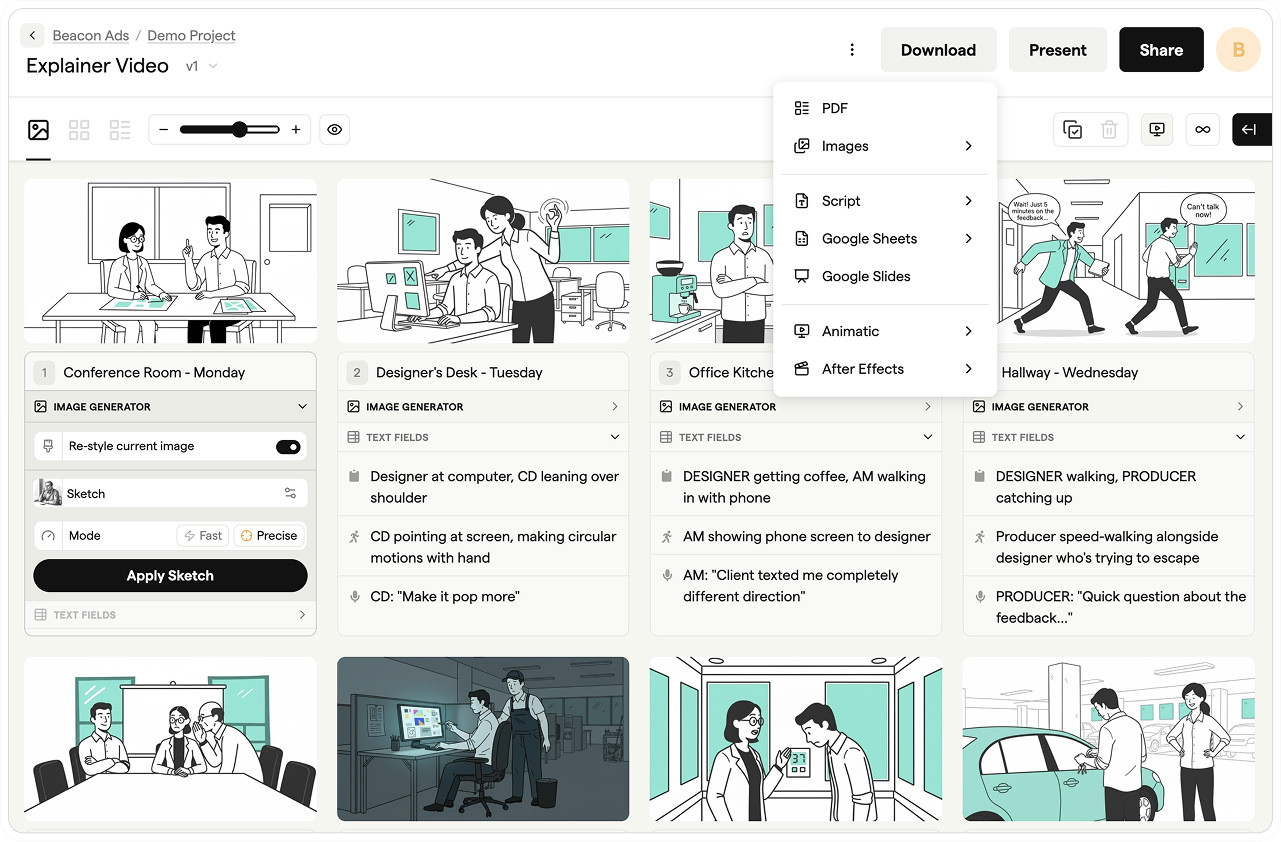
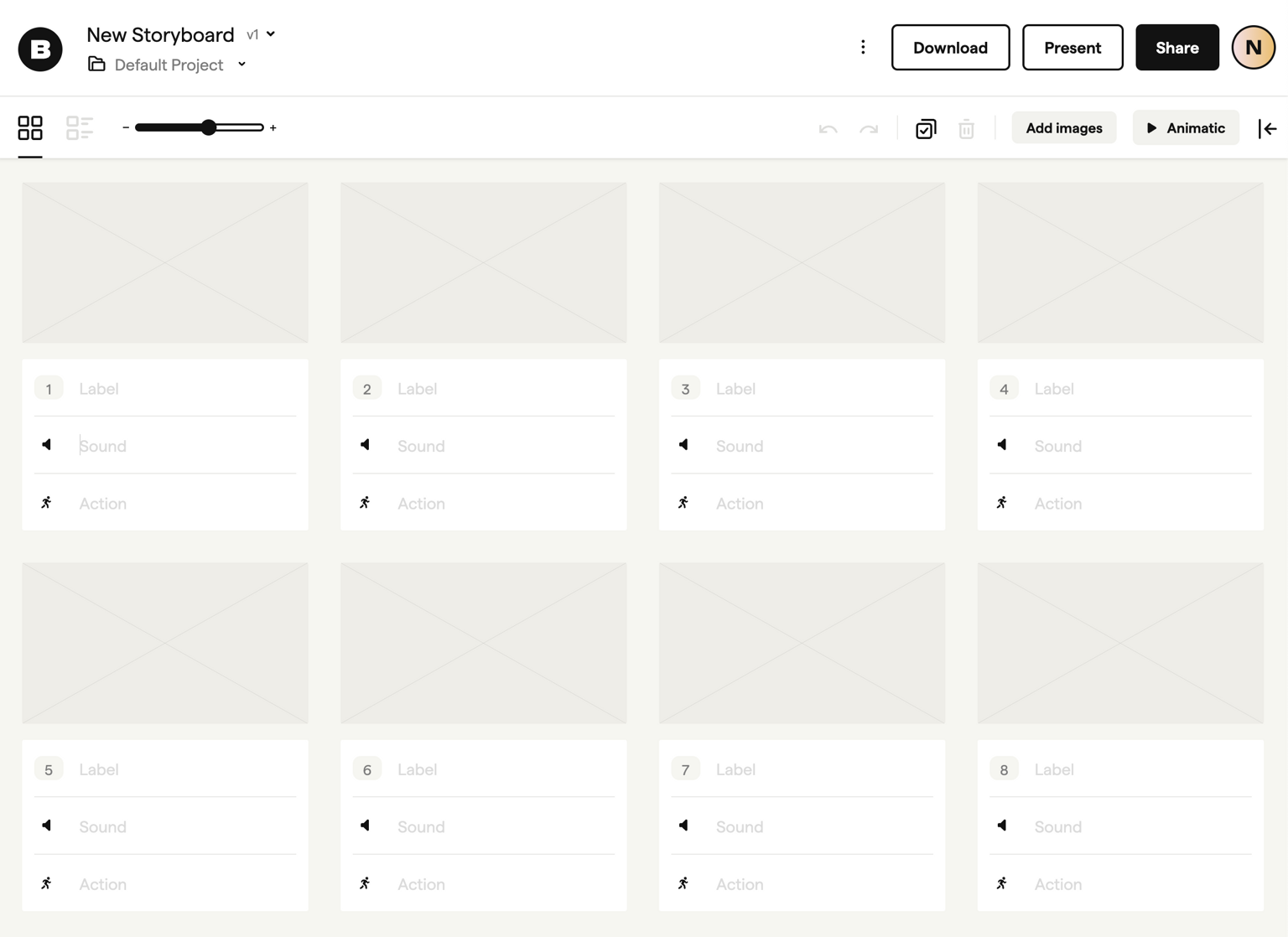
Who this is for: Boords is the ideal storyboarding software for video professionals and creative teams looking to streamline their pre-production process. Whether you're a seasoned producer, an independent filmmaker, or part of a video production agency, Boords simplifies the storyboard creation and collaboration process, making it a must-have tool for anyone involved in the video production process.
Its ease of use and collaboration features help to eliminate the traditional hurdles faced during the pre-production phase. The cloud-based functionality ensures that teams, whether they're located in the same room or across continents, can collaboratively create, edit, and fine-tune storyboards without friction.
Why video pros like it: As a storyboarding software, Boords stands out with its intuitive interface and robust collaborative features, streamlining the storyboarding process. It enables real-time collaboration, allowing team members to comment, give feedback, upload images, and revise storyboards efficiently. This tool ensures everyone is aligned throughout the creative process, saving valuable time. Moreover, Boords includes a powerful ai storyboard generator feature, which instantly transforms scripts into visually detailed, engaging storyboards.
Creating storyboards is a breeze, with drag-and-drop tools that allow you to effortlessly arrange images and create visual narratives. Boords also includes an ai storyboard generator from script feature, making it even easier to quickly turn scripts into professional storyboards.
It also features an automatic animatic tool which instantly turns any storyboard into a full animatic with subtitles. Upload a sound file and time your animatic with the timeline and you're ready to move into production.
- Free version: Yes

- Collaboration: Editing seats depend on your plan; guest reviewers can comment without an account, with no limit on guest commenters
- Support: In-app chat
Storyboard Software Directory
As with any tool, the effectiveness of a storyboard lies not just in the clarity of your creative vision, but also in the storyboard maker used to bring that vision to life. With a range of choices available, making an informed decision is important. Some software offer a wide set of features, while others focus on simplicity and ease of use.
When deciding on the best storyboard software option for you, consider whether you'll use the features you're paying for. For example, Toon Boom Storyboard Pro or Celtx offer very different features compared to Storyboard That.
If Boords isn't quite right for you, we've compiled a list of 10 other storyboard software options available with information on plans and features to help you make the best decision for your project.

Celtx
All-in-one pre-production platform with integrated scriptwriting and storyboarding
Celtx bundles scriptwriting, storyboarding, scheduling, and budgeting into one web-based platform. Your storyboards link directly to script scenes, so changes in the screenplay flow through to your visual plan. The storyboard tool uses a drag-and-drop canvas where you arrange images, add shot notes, and annotate frames. It is built for teams working through the full pre-production pipeline, not just the storyboarding step.
Pros
- ✓Script-to-storyboard linking keeps your visual plan synced with scene changes
- ✓All-in-one pre-production covers scheduling, budgeting, and call sheets
- ✓Real-time collaboration lets your team work in the same project simultaneously
- ✓Integrates with industry-standard formats for easy import and export
Cons
- ✗Storyboarding is one module among many. Dedicated storyboard features are less developed than standalone tools
- ✗No free tier. The 7-day trial is short for evaluating a full production workflow
- ✗Web-only access requires a stable internet connection
Pricing: From $24.99/month (Screenwriter plan). Production bundles start at $39.99/month.
A strong choice if you need script-to-storyboard integration as part of a broader pre-production workflow.

Filmustage
AI-driven pre-production platform with storyboards synced to script breakdowns
Filmustage uses AI to break down scripts into production elements automatically. Upload a screenplay and it identifies characters, locations, props, and VFX shots, then generates a structured breakdown you can convert into storyboard frames. The storyboard tool syncs directly with your script breakdown, so each frame maps to specific scene elements. It is designed for production teams who want to move from script to visual plan without manual data entry.
Pros
- ✓AI-powered script breakdowns save hours of manual tagging
- ✓Storyboard frames link directly to scene breakdowns and production elements
- ✓Automatic identification of locations, props, and VFX requirements
- ✓Export to industry-standard formats including Movie Magic and Gorilla
Cons
- ✗Storyboarding is secondary to the breakdown engine. Dedicated storyboard tools offer more visual flexibility
- ✗AI breakdowns require manual verification. Accuracy varies with script formatting
- ✗Premium pricing puts it out of reach for independent filmmakers
Pricing: From $39.90/month. Enterprise plans available with custom pricing.
Purpose-built for productions that need script breakdowns and storyboards in one workflow. Not a fit if storyboarding is your primary need.
Storyboard That
Online digital storyboarding focussed on education
Storyboard That is a drag-and-drop storyboard maker built for classrooms. You build frames by placing pre-made characters, scenes, and objects onto a canvas, then arrange them into a narrative sequence. The art style is simple and cartoon-like, which works for educational projects, social stories, and visual narratives where photorealism is not the goal. Teachers get classroom management tools, assignment templates, and curriculum-aligned resources.
Pros
- ✓Huge library of pre-made characters, scenes, and props. No drawing required
- ✓Classroom management tools with student accounts and assignment tracking
- ✓Storyboard templates for different formats: traditional, T-chart, timeline, and spider map
- ✓Quick to learn. Students can build their first storyboard in minutes
Cons
- ✗Cartoon art style limits use for professional film or video production
- ✗Free tier restricts you to 2 storyboards per week with watermarks
- ✗No collaboration features on lower-tier plans
Pricing: Free (limited). Teacher plans from $12.99/month. Business plans from $14.99/month.
The best storyboard tool for educators and students. Not suited to professional production work.

Milanote
Visual collaboration tool for creative teams with flexible storyboard boards
Milanote is a visual planning tool that gives you an infinite canvas for organizing images, notes, links, and files into flexible boards. It is not a dedicated storyboard app, but creative teams use it to build mood boards, shot lists, and storyboard layouts by dragging reference images into a structured grid. The freeform canvas means you are not locked into a fixed panel layout. You can mix storyboard frames with notes, scripts, and visual references in the same workspace.
Pros
- ✓Freeform canvas lets you mix storyboard frames with notes, scripts, and references
- ✓Clean, visual interface designed for creative workflows
- ✓Real-time collaboration with commenting and task assignment
- ✓Generous free tier with 100 notes, images, and links
Cons
- ✗No dedicated storyboard features like frame numbering, shot types, or camera annotations
- ✗Exports are limited to PDF and image files. No video or animatic output
- ✗Boards can get cluttered without careful organization
Pricing: Free (up to 100 items). Paid plans from $12.50/month per user.
A flexible visual planning tool for creative teams who want to combine storyboards with broader project planning. Not a replacement for dedicated storyboard software.

Studio Binder
Video, photo, TV & film production management software
StudioBinder is a production management platform that includes storyboard creation as part of its broader pre-production toolkit. You build storyboards by uploading images or using the shot list feature, which lets you plan camera angles, shot types, and movement for each frame. The storyboard tool connects directly to your shot list, call sheets, and production calendar. It is built for teams managing the full production workflow from script to wrap.
Pros
- ✓Storyboards link directly to shot lists, schedules, and call sheets
- ✓Shot list builder includes camera angle, movement, and lens selection per shot
- ✓Free tier includes basic storyboarding and production management features
- ✓Clean, modern interface that is easy to navigate
Cons
- ✗Storyboarding is a supporting feature, not the core product. Frame editing tools are basic
- ✗The image-upload approach means you need your frames created elsewhere
- ✗Advanced features like breakdown reports require paid plans
Pricing: Free (limited features). Indie plan at $35/month. Professional at $49/month.
Best for production teams who need storyboards as part of a managed production workflow. If storyboarding is your main need, a dedicated tool will give you more.
Toon Boom Storyboard Pro
Desktop storyboard software which combines drawing and animation tools with camera controls
Storyboard Pro is the industry standard for animation storyboarding. It combines drawing tools, a timeline, and camera controls in a desktop application built for frame-by-frame work. You draw directly into panels, add camera movements, and export animatics with sound. Major animation studios use it for feature films and TV series. The toolset is deep: onion skinning, custom brushes, 3D camera moves, and full audio sync. It is powerful, but the learning curve is steep.
Pros
- ✓Industry-standard drawing and animation tools used by major studios
- ✓Built-in camera controls with 3D movement for dynamic animatics
- ✓Timeline with audio sync for creating polished presentation animatics
- ✓Export to editorial formats including EDL and AAF
Cons
- ✗Steep learning curve. Expect weeks of practice before you are productive
- ✗Expensive. The one-time license plus annual subscription puts it out of reach for casual users
- ✗Desktop only (Mac and Windows). No web or mobile version
Pricing: $58.50/month or $1,023 one-time license plus $258/year for updates.
The most powerful storyboard software available. Worth the investment if you work in animation professionally. Overkill for most other use cases.
Canva
Online design tool offering some storyboard templates
Canva’s storyboard maker lets you build visual sequences using drag-and-drop templates. You choose a storyboard template, drop in images from the stock library or your own uploads, and add text overlays for dialogue and action notes. It is fast to set up and free to use, which makes it a good starting point for simple projects. The storyboard templates cover basic panel layouts, but you will not find dedicated features like shot types, camera annotations, or frame-to-script linking.
Pros
- ✓Free storyboard software with no time limits or watermarks on the basic plan
- ✓Massive stock image and illustration library for quick visual reference
- ✓Storyboard templates get you started in minutes
- ✓Team collaboration with shared folders and real-time editing
Cons
- ✗No dedicated storyboard features. No shot types, camera angles, or frame numbering
- ✗Templates are rigid. Customizing panel layouts beyond the presets is limited
- ✗Not designed for production workflows. No export to standard storyboard formats
Pricing: Free. Canva Pro from $14.99/month for premium templates and stock assets.
The best free storyboard maker for simple projects and quick visual planning. You will outgrow it fast if you need production-grade features.

Miro
Collaborative online whiteboard with dedicated storyboard templates and tools
Miro is a collaborative whiteboard platform with storyboard templates for remote teams. You build storyboards on an infinite canvas using sticky notes, images, shapes, and connectors, then share the board with your team for real-time feedback. The storyboard templates provide a basic panel structure, but the real value is the collaboration layer: video calls, commenting, voting, and cursor tracking let distributed teams review storyboards together. It is a general-purpose tool that works for storyboarding, not a purpose-built storyboard app.
Pros
- ✓Real-time collaboration with video chat, comments, and cursor tracking built in
- ✓Infinite canvas with flexible layout. Not locked into a fixed panel grid
- ✓Integrates with Slack, Jira, Google Drive, and 100+ other tools
- ✓Generous free tier with 3 editable boards
Cons
- ✗No storyboard-specific features like shot types, camera angles, or animatic export
- ✗Templates are basic starting points. You will spend time customizing them
- ✗Performance slows on large boards with many images
Pricing: Free (3 boards). Starter at $10/month per user. Business at $20/month per user.
A solid choice for remote teams who need to storyboard collaboratively. Not a replacement for dedicated storyboard software if you need production features.

Plot
Online storyboard creator with script editing
Plot is a web-based storyboard creator that pairs visual storyboarding with a built-in script editor. You write scenes in the script panel and build corresponding storyboard frames alongside them, keeping your written and visual plans in sync. The drawing tools are basic but functional. You can sketch directly in the browser, upload images, or use a combination of both. Plot focuses on the core storyboarding workflow without the overhead of full production management features.
Pros
- ✓Side-by-side script editor keeps your storyboard synced with your screenplay
- ✓Clean, focused interface without unnecessary complexity
- ✓Browser-based with no software to install
- ✓Export to PDF with customizable print layouts
Cons
- ✗Drawing tools are limited compared to desktop applications like Storyboard Pro
- ✗Small user base means fewer templates and community resources
- ✗No collaboration features. Designed for individual use
Pricing: Free trial. Paid plans from $15/month.
A good storyboard tool for solo filmmakers who want script-to-storyboard integration without the complexity of a full production platform.
MovieStorm
3D animation software which can produce storyboards
MovieStorm is a 3D animation tool that lets you create previsualization storyboards using virtual sets, characters, and camera rigs. You build scenes in a 3D environment, position characters, set camera angles, and render out frames or short animated sequences. It is designed for filmmakers who want to pre-visualize complex shots before committing to production. The learning curve sits between consumer-friendly tools and professional 3D software like Maya or Blender.
Pros
- ✓3D virtual sets and characters let you previsualize complex shots and camera movements
- ✓Camera rig system with lens, angle, and movement controls
- ✓Render storyboard frames or animated sequences for presentation
- ✓One-time purchase with no ongoing subscription costs
Cons
- ✗Dated interface and graphics compared to modern 3D tools
- ✗Limited character and set customization without purchasing add-on packs
- ✗Small community and infrequent updates
Pricing: One-time purchase from $50. Add-on packs sold separately.
A niche tool for filmmakers who need 3D previsualization on a budget. Most teams will be better served by dedicated storyboard software.
AI Storyboard Software
AI is changing how teams create storyboards. Wistia's 2025 State of Video Report found that 41% of brands now use AI in video production, more than double the previous year. Instead of drawing or sourcing every frame manually, you can generate storyboard images from text descriptions, script lines, or rough sketches.
Can ChatGPT make storyboards? Yes. ChatGPT can help draft scene descriptions and generate or edit images, with image availability depending on your plan and workspace settings. Boords' AI storyboard generator combines image generation with frame organization, client review, and animatic creation in one workspace.
Other AI storyboard tools focus on speed over precision. They're useful for early concepting, but the output often needs refinement before it's ready for client presentations. Style consistency across frames is still a challenge for most AI generators.
The practical approach for most teams: use AI to generate a rough first pass, then refine the frames manually. This cuts production time without sacrificing quality where it matters. If you're evaluating AI-powered storyboard software, test whether the generated images match your project's visual style before committing.
Buyer's Guide
Will you be working with other people?
Will you be making storyboards with other people? Collaborative efforts often require multiple teammates to provide input, suggest changes, and even work on different sections of a storyboard simultaneously. In such a case, you might want to stay clear of Mac, Windows, or iPad storyboarding software. Instead, look for an online storyboard app which will allow you to collaborate with other people in real-time. Making changes is much easier when all teammates can access, edit, and review the same storyboard in real-time. This not only fosters a more efficient workflow but also ensures that everyone stays on the same page, making the iterative process of refinement smoother and more cohesive. Tools like Miro, rated 4.7/5 on G2 with over 11,000 reviews, show how central real-time collaboration has become to creative teams.
How will you use your storyboard?
Storyboarding is just one part of the pre-production process. If you're involved in animation or video production, you'll likely make an animatic after your storyboard is completed. This rough mock-up provides a clearer sense of timing, pacing, and flow, bridging the gap between static images and the final animation. If you're new to the process, our guide on how to storyboard covers the fundamentals.
In this case, you'll want to find storyboard software which integrates with the other tools in your workflow. Adobe's After Effects is a popular choice of animation software, and caters to everything from transition effects to character animation, ensuring that your transition from storyboard to animatic is as smooth as possible.
Do you need a drawing tool?
The very essence of a storyboard lies in its visual representation. Your storyboard will need images.
To populate your storyboard with images, there are two options; draw them yourself, or look for storyboarding software with an image library. If a sophisticated drawing interface with specific pen tools is a high priority, you should consider specialist image editing software. Adobe Photoshop is the gold standard for many, but new tools like Procreate for iPad offer a great image editing experience too (sadly procreate isn't available for Android users yet).
But, be warned! Software like Adobe Photoshop isn't set up to deal with storyboarding out of the box. Simple tasks like re-arranging frames can quickly become tedious. Many teams find that starting with a storyboard template is faster than building frames from scratch in a general-purpose design tool.
What's your budget?
As a rule, storyboard software falls into two camps when it comes to price. First, there's the classic desktop software for Mac & Windows, often acquired through a one-time purchase, which gives users perpetual access to the tool. This type of storyboard software typically requires just one single financial outlay.
The second option is an online storyboard maker paid for with a subscription, which can offer constant updates, cloud storage, and collaborative features.
If cost is the primary concern, several free storyboard software options exist. Canva (rated 4.7/5 on Capterra from 12,900+ reviews) and Miro both offer free tiers, and Storyboard That provides limited free access. The trade-off: free tools rarely include dedicated storyboarding features like shot annotations, frame numbering, or animatic export. For more detail on what each tool offers, check the comparison table above.
Traditionally, storyboard artists have gravitated towards desktop software due to its reliability and comprehensive features, but as the digital world evolves and the need for flexibility and collaboration grows, there's been a noticeable pivot towards online platforms in more recent times.
Find Your Perfect Storyboarding Software
The right storyboard software depends on your workflow, your team, and your project. A solo filmmaker needs different tools than a 20-person agency. An animator working in Toon Boom Storyboard Pro has different requirements than a marketing team using Canva for quick social media storyboards.
Start with the comparison table to narrow your options by price, platform, and features. Browse storyboard examples to see what different tools produce. Then try two or three that fit your criteria before committing.
Whether you're working with a dedicated storyboard app or a general-purpose design tool, the goal is the same: communicate your visual plan clearly so your team can execute it. The best storyboard software is the one that gets you from idea to production with the least friction.
Sharper preproduction, less back-and-forth
Workflow tips and Boords product updates for video and brand teams, twice a week.
More from the blog

Frequently asked questions
Get every video signed off before production starts
Create scripts, storyboards, and animatics with your team.
Collect client feedback, keep every version on record, and go into production knowing exactly what was approved.