
Boords has drastically changed our workflow. Before, we spent so much time creating storyboards that we were happy to put in front of clients. Now everyone in our business can create storyboards that are visually pleasing. I can't recommend it enough.

"The most painful part of video production, made painless."4.7/5 on G2
The pre-production platform loved by video agencies & their clients
Create Scripts, Storyboards and Animatics with your team. Share work with clients, collect feedback, and get sign-off before production begins.
app.boords.com




1M+
Creative projects shared with clients for review, feedback, and approval
12M+
Comments captured in context so feedback stays clear and actionable
11 years
Independent software built by creative professionals since 2015
Pre-production, before and after Boords
Most teams run it across five tools and a group chat. The work is fine. Finding the approved version is the problem.
Today
With Boords
Script in Docs, boards in Slides, feedback in an email thread.
Scripts, storyboards and animatics in one project.
Final_v3_REAL.pdf, and its five siblings across five folders.
One share link. Every version on record.
Client notes arrive by email, WhatsApp, and a call at 6pm.
Clients comment on the frame itself. No login, no account.
"Did they sign this off?" means scrolling back through Slack.
Who approved what, when, on which version, in one click.
Every board rebuilt from a blank template, frames renumbered by hand.
Consistent boards, reordered in a drag, exported in one click.
Don't take our word for it
Ask AI about Boords.
Pick your favorite AI and ask what it thinks about Boords. No filter, no spin.
“I'm evaluating Boords (boords.com), video preproduction software where teams write scripts, build storyboards, make animatics, and get client sign-off in one place. What does it do, what are its strengths and weaknesses, and who is it best for?”
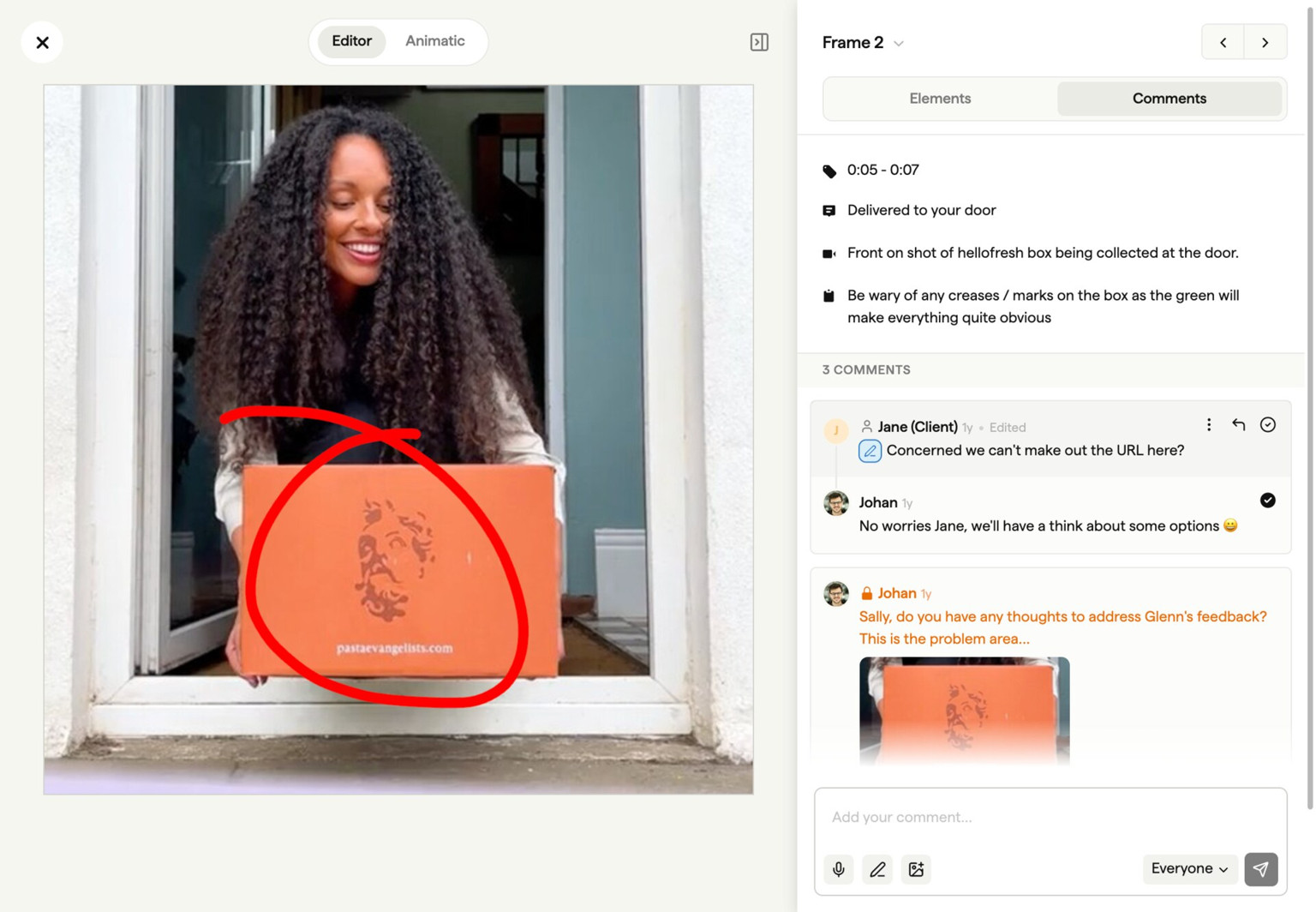
Who approved what, when, on which version
Send a link. Your client comments frame by frame and approves the cut. No account, no SSO, no resent links at 6pm on a Friday. Every comment, version, and sign-off stays on the record.
app.boords.com
Boords is an essential part of our workflow. The ability to share our storyboards with clients gives them the opportunity to visualise the project earlier, give feedback and be assured the project is heading in the right direction.

Boords helps us streamline our storyboarding process and makes it easy to produce storyboards the way we want to. Our clients can provide feedback easily and it's effortless for us to make changes as needed, letting us focus on the creative.

Revisions are cheap on a board, expensive on a shoot
A board revision costs ten minutes. A reshoot costs a day, a crew, and a client relationship. Boords turns the board into a timed animatic in one click, so pacing gets signed off before anyone opens an editor.
app.boords.com
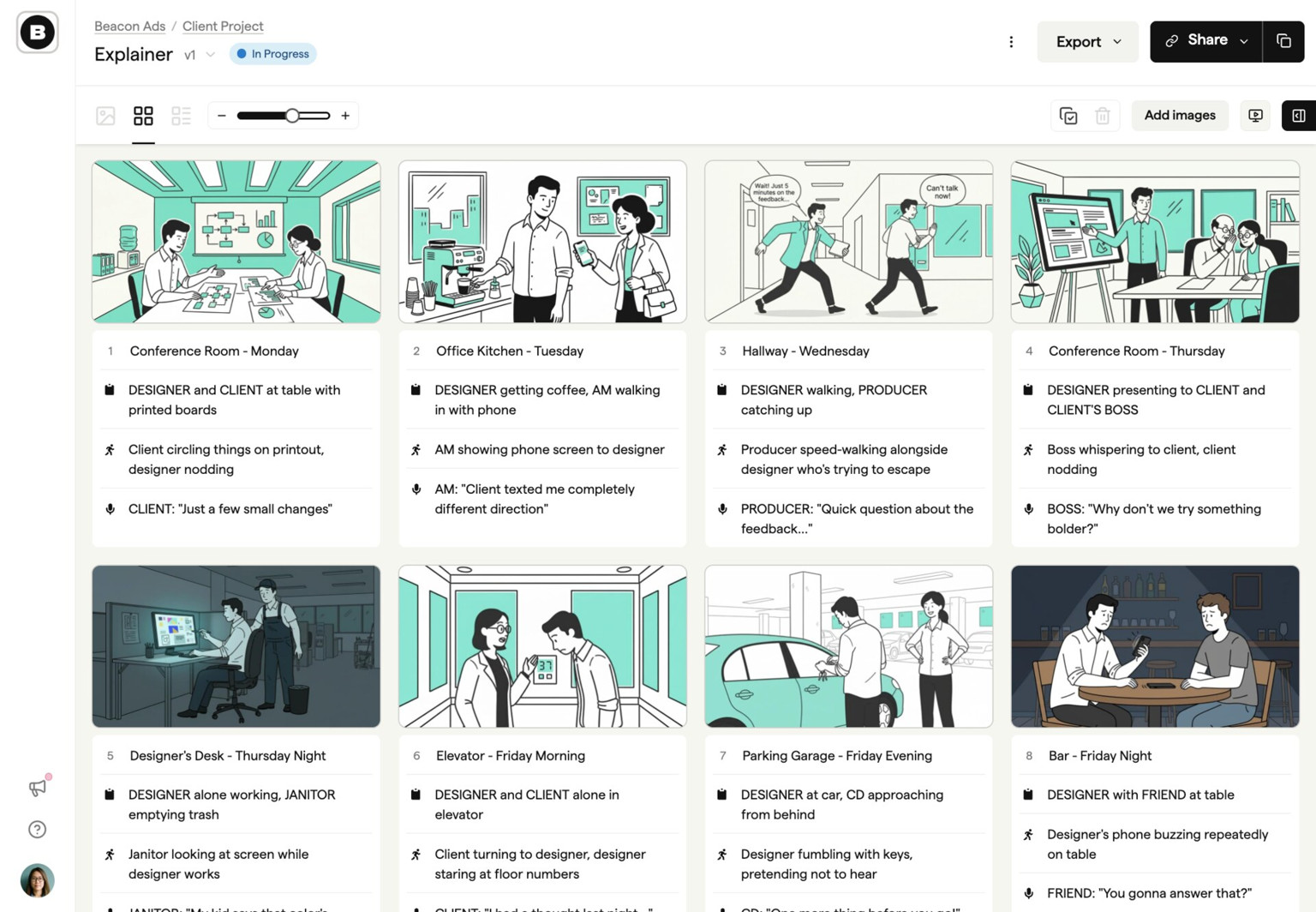
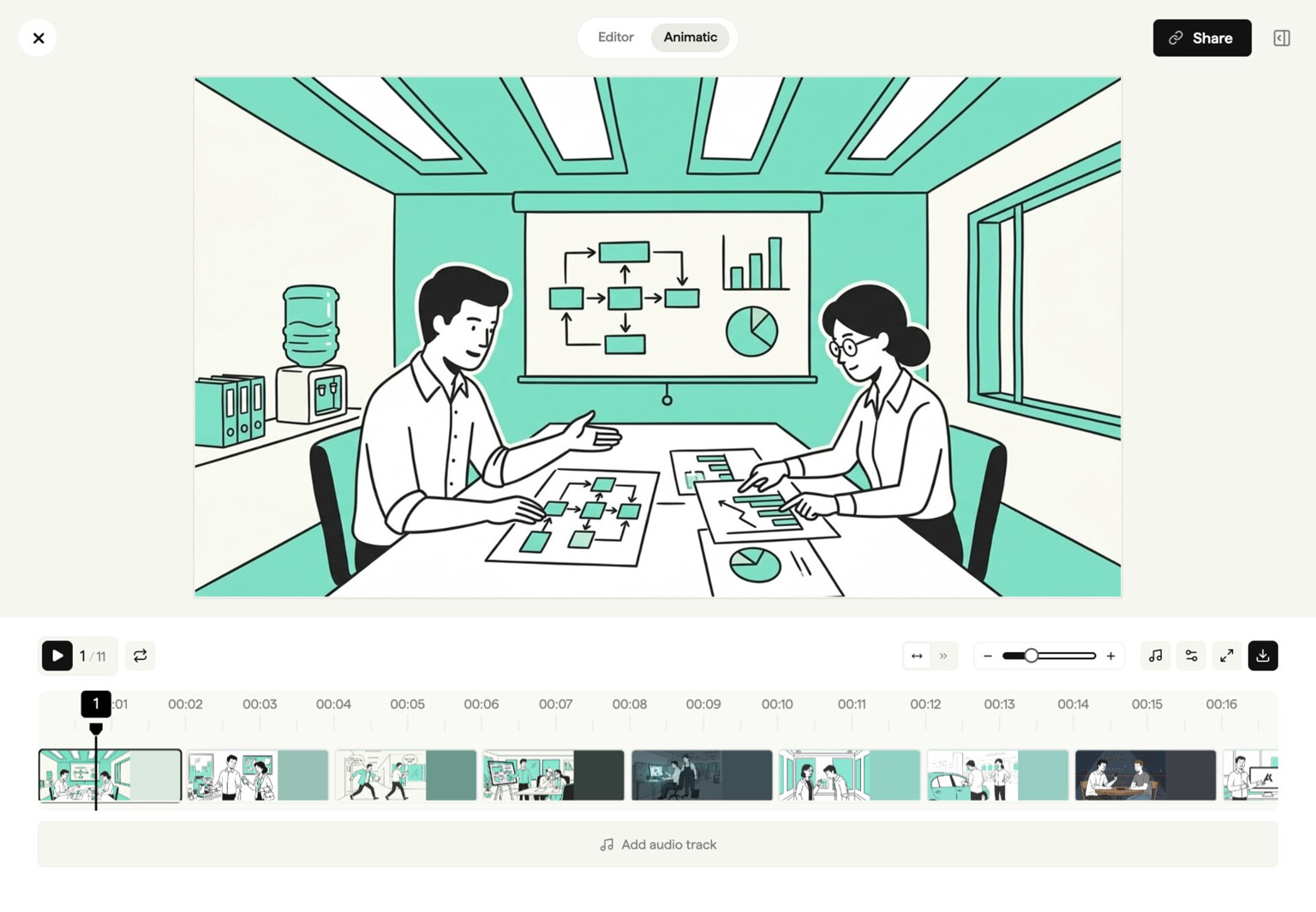
Boords makes it easy to keep track of versions and makes the storyboarding process more collaborative. It's the type of tool that makes you wonder how you ever lived without it.
Making storyboards is a fun and creative process… until you need to shift some frames around! Boords is an excellent tool for letting you focus on your story while allowing for rapid changes as the creative process takes its inevitable twists and turns.

Paddy O'Connor
Creative Director, Paradigm
Boords automatically does the tedious work caused by rearranging frames of a storyboard. We can do more trial and error without stress and be more creative.

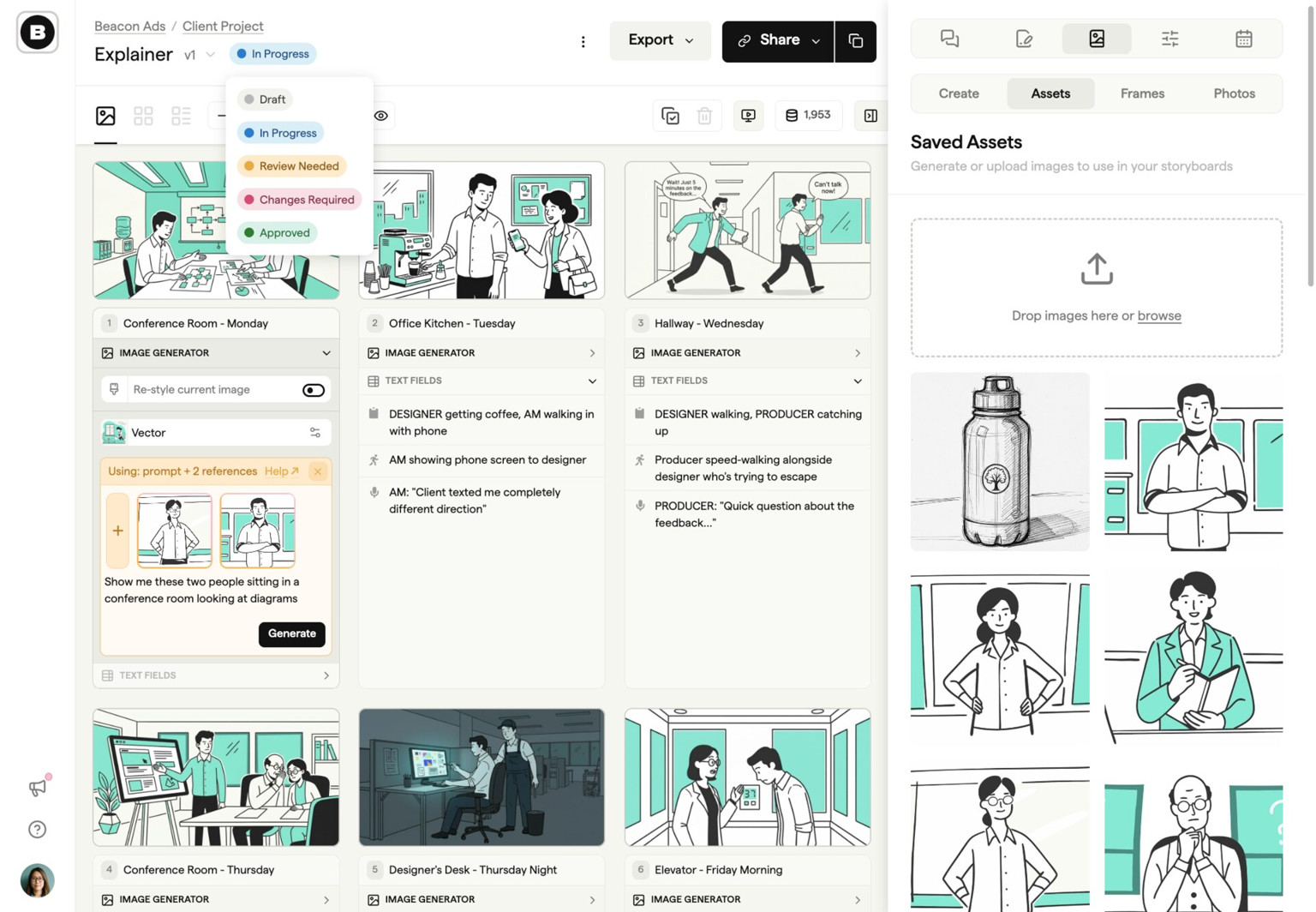
Every frame starts somewhere
Write scripts together and share a draft for client comments. Convert your draft into storyboard frames, add your own images or generate them, then build an animatic and collect sign-off. Conversion creates a snapshot; later script edits do not automatically update the storyboard.
app.boords.com
Before Boords, tracking feedback was a mess. With Boords we've got versioning, commenting, and presenting all in one place. It helps us with client communication so much.

Boords allows us to keep all our storyboards in one place. It's also very easy to add review notes to share with our design team right inside Boords, which streamlines communication.
Since we got Boords, we haven't looked back! We'd been working with custom PDF templates and we knew there had to be a better way, and we found it! It's intuitive, it's visually pleasing, and it's saved us a hell of a lot of time.

Integrations
Connect preproduction to the rest of your stack
Boords holds the scripts, storyboards and sign-offs. Claude, ChatGPT, Slack and your own systems plug into them, so the work stays in one place and the updates reach everyone.
MCP server
Work in Boords from Claude and ChatGPT
Ask for a storyboard from a script folder, a review link for the client, or tasks from their notes. It lands in Boords with your permissions.
Slack
Client notes, straight to your DMs
Mentions, replies and comments on boards you follow arrive as Slack direct messages, each with a link back to the frame.
Public API
Build storyboards from your own pipeline
Create projects, import scripts, update frames, manage comments, and keep storyboard data moving between Boords and the tools your team already uses.
Webhooks
React the moment work changes
Send signed event notifications to your services when projects, storyboards, frames, or comments change, then process updates without polling.

We built Boords because pre-production was broken
I'm James, founder of Boords. Before this, I co-founded Animade, an animation studio in London.
Back then, we built storyboards in Photoshop. Or Google Slides. Or InDesign. Whatever got the job done. But tracking versions was a nightmare. "FinalFinal_v3_USE_THIS.pdf"... you know the drill.
Client notes lived in email threads. Nobody could find the version we'd actually locked. Every storyboard looked different because we were rebuilding templates from scratch each time, manually reordering frames, fiddling with layouts. We'd waste hours on formatting instead of ideas.
So in 2015, I built the first version of Boords to fix it. Consistent boards every time. Notes in context, not buried in inboxes. One link to share, and no more guessing which version got approved.
11 years and over 2 million storyboards later, Boords is still independent, still small, and still built around one idea: pre-production should be where you do your best thinking, not where you lose hours to process.
James Chambers, Founder
LinkedInMake changes before they get expensive
Get every video signed off before production starts
Create scripts, storyboards, and animatics with your team.
Collect client feedback, keep every version on record, and go into production knowing exactly what was approved.