Creative Brief Template: How to Write One (Free PDF)

A creative brief template gives your project a clear starting point. It defines the audience, the deliverables, the goals, and the constraints before any creative work begins. Whether you're briefing a video production team, a design agency, or an in-house marketing department, the brief is where alignment happens.
This guide covers every element of a strong creative brief, with a free PDF template you can download and a filled-in example to reference.
Free Creative Brief Template
Perfect for any kind of creative project
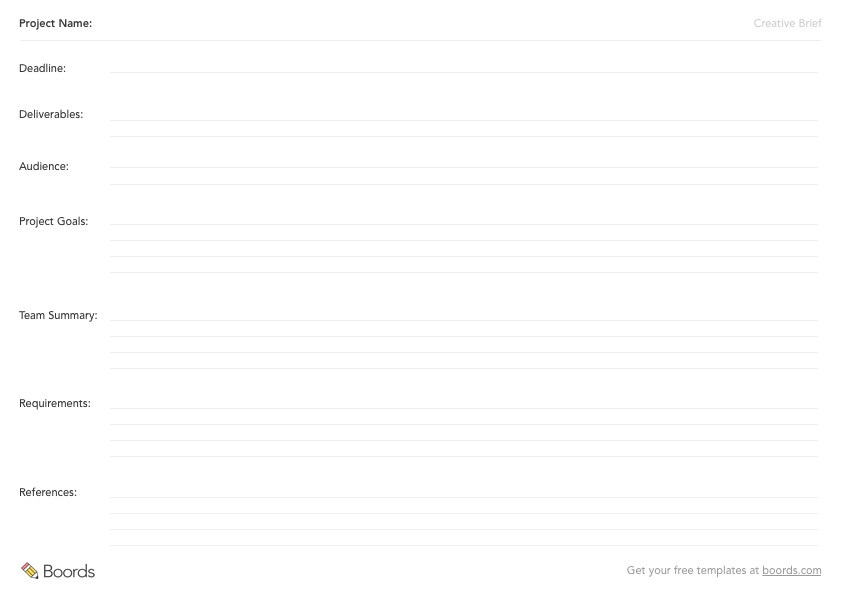
What Is a Creative Brief?
A creative brief is a short document that outlines the objectives, audience, deliverables, and constraints for a creative project. It acts as a single source of truth for everyone involved, from the client to the creative team.
The creative briefing process forces clarity. Before anyone opens a design tool or writes a script, the brief answers the foundational questions: who is this for, what does it need to achieve, and what are the boundaries? A good brief prevents scope creep, reduces revision cycles, and gives the creative team something concrete to work against.
Creative briefs are used across every discipline. Ad agencies use them for campaigns, design studios for branding projects, and video production companies for aligning on tone, format, and deliverables before a shoot. The format varies, but the purpose is always the same: get everyone on the same page before the work starts.
A design brief and a creative brief overlap significantly. The difference is scope. A design brief focuses on visual output like a logo, a website, or a set of social assets. A creative brief is broader and might include video, copywriting, or an entire campaign. For most projects, the terms are interchangeable.
Elements of a Creative Brief
An effective creative brief provides constraints, outlines top-level objectives, and guides the creative process. Constraints sound limiting, but they make creative work easier. They give you something to push against. Here are the six elements every creative brief template should include.
1. Deliverables
Start with what you're actually making. A 30-second TV spot is a different brief from a series of social media assets. A brand guidelines document has different requirements from an explainer video.
Be specific about format, dimensions, duration, and quantity. If the deliverable is a video, state the target length, aspect ratio, and where it will be distributed. If it's a design project, specify file formats and sizes. The deliverable type shapes every other decision in the brief, so get it right first.
If the project involves video or animation, your brief will likely need supporting documents. A storyboard plans the visual sequence. A shot list organises each camera setup.
2. Target Audience
Be as specific as possible. "Adults aged 25-40" is not a target audience. "First-time homeowners in urban areas who are renovating on a budget" is.
Define demographics (age, location, income) and psychographics (values, interests, pain points). If the project is for a company, describe their customers in detail. If you can, pick one real or fictional person who represents the ideal viewer or reader. Give them a name. Refer back to this person during the creative process. Every decision becomes easier when you can ask: "Would Sarah care about this?"
The more precisely you define your audience, the sharper your creative output will be.
3. Goal
Every creative project exists to achieve something. Name it. Does the piece need to sell a product, raise brand awareness, explain a process, or drive sign-ups? Define the key messages your deliverable must communicate.
Separate primary goals from secondary ones. A product video might have a primary goal of driving demo requests and a secondary goal of establishing technical credibility. When goals compete, the brief should make priorities explicit so the creative team knows which to favour.
Write measurable goals where possible. "Increase click-through rate by 15%" gives the team a clearer target than "raise awareness."
4. Deadline
Set a final delivery date and work backwards. Break the project into phases with milestones: concept approval, first draft, review rounds, final delivery. Personal projects benefit from a timeline just as much as client work. Without deadlines, projects drift.
For client projects and festival submissions, the deadline is often fixed. Build buffer into earlier milestones so the final date isn't at risk. If possible, commit to your dates publicly. Social accountability is a powerful motivator.
State how many revision rounds are included. This prevents the brief from becoming an open-ended engagement.
5. Creative Team
Document everyone involved and their roles. Project managers, copywriters, designers, directors, producers, marketing leads, and the client all need to be accounted for.
List each person's name, role, and contact information. Identify the decision-maker (the person who gives final approval) and any stakeholders who need to review work at each stage. Confusion about who approves what causes more delays than any other single factor in creative projects.
Once the brief is signed off and you're heading into production, a call sheet keeps the whole team organised on shoot day.
6. Requirements and References
Gather your constraints and reference material upfront. Is there a brand style guide the work must follow? Existing assets that need to be incorporated? Legal or compliance requirements?
Collect references that illustrate the tone, style, or approach you're after. Include examples of work you admire and, just as importantly, examples you want to avoid. "Like this Patagonia campaign, but warmer in tone" is more useful than "make it feel premium."
Document technical requirements too: file formats, platform specifications, accessibility standards, and regulatory constraints. The more background information you gather at the start, the fewer surprises appear halfway through production.
Get Your Free Creative Brief Template
A PDF template for any creative project
How to Write a Creative Brief
Knowing the elements of a creative brief is one thing. Writing one that actually works is another. Here's a step-by-step process for any creative project.
Step 1: Talk to the Stakeholders
Before you write anything, have a conversation. Meet with the client or project owner and ask open-ended questions about business goals, audience, and expectations. Listen for the subtext. Often the real objective isn't what's stated first.
Step 2: Define the Single Core Message
Distill everything you've heard into one sentence. If the audience remembers only one thing after engaging with the deliverable, what should it be? This sentence becomes the anchor for every creative decision.
Step 3: Research the Audience
Go beyond demographics. Look at how the target audience talks, what they search for, where they spend time, and what they respond to. If the company has customer interviews or survey data, use it. First-party data beats assumptions.
Step 4: Fill in the Briefing Template
Work through each section of your creative brief template: deliverables, audience, goal, deadline, team, and requirements. Be specific in every field. Vague briefs produce vague work.
Step 5: Add References and Constraints
Attach visual references, competitor examples, brand guidelines, and any technical specs. The creative team should be able to understand the brief without a follow-up meeting.
Step 6: Get Sign-Off
Circulate the brief to all stakeholders and get written approval before creative work begins. The brief is a contract between the client and the creative team. Changes after sign-off should go through a formal change request process.
Step 7: Use the Brief as a Checkpoint
Revisit the brief during reviews. When evaluating creative work, the question isn't "do I like this?" but "does this deliver on the brief?" The brief keeps feedback objective and prevents subjective drift.
Creative Brief Template for Video Production
Video projects need a creative brief that goes further than a standard design brief. Beyond the core elements, a video creative brief should cover:
Tone and style. Define the feel of the video: documentary, cinematic, corporate, playful. Attach reference clips that capture the target mood.
Script or voiceover direction. Specify whether there will be dialogue, narration, on-screen text, or a combination. Note the intended tone of voice and any mandatory messaging.
Visual approach. Describe the look you're after. Live action, animation, mixed media? Include colour palette and mood references.
Distribution. State where the video will live. YouTube, Instagram, a trade show booth, an internal training portal? Platform dictates format, length, and aspect ratio.
Production logistics. Cover location requirements, talent needs, props, wardrobe, and permits. These constraints affect budget and timeline directly.
A video creative brief leads naturally into pre-production documents. The brief defines what the video should achieve. A storyboard translates that into how it looks, frame by frame. A shot list breaks the storyboard down into individual camera setups. Together, these three documents give a production team everything they need to shoot with confidence.
If you're working in video production, Boords connects your creative brief to your storyboard and shot list in a single workflow.
Creative Brief Example
A filled-in brief is worth more than a blank template. Here's a realistic example for a fictional 60-second product video.
| Field | Example |
|---|---|
| Project title | Oatly Barista Edition, "Morning Ritual" product spot |
| Deliverables | 1x 60-second hero video (16:9), 1x 15-second cutdown (9:16 for Instagram Stories) |
| Target audience | Urban millennials, 28-38, who buy specialty coffee at home. They care about sustainability and quality but don't want to be preached at. |
| Goal | Drive a 20% increase in Barista Edition trial purchases over Q2. Primary message: "The barista-quality oat milk you can pour at home." |
| Key messages | 1. Froths and steams like dairy milk. 2. Made for coffee lovers, not just vegans. 3. Available at your local grocery store. |
| Tone and style | Warm, everyday, slightly wry. A24 colour grading meets cereal commercial. No voiceover, all on-screen text and ambient sound. |
| References | Mood board link. Inspired by: Apple "Shot on iPhone" campaign (simple, human), Oatly's existing print ads (irreverent copy). Avoid: stock-footage corporate feel, heavy-handed sustainability messaging. |
| Deadline | Concept approval: March 15. Storyboard sign-off: March 22. Shoot: April 3-4. Rough cut: April 18. Final delivery: May 1. |
| Creative team | Director: Mia Chen. Producer: Raj Okonkwo. Editor: Sam Reeves. Client lead: Lisa Park (Oatly). Final approval: Lisa Park. |
| Budget | £45,000 total (production £30,000, post-production £10,000, contingency £5,000). |
| Requirements | Must include Oatly logo end card (3 seconds minimum). Must comply with ASA food advertising standards. Deliver in ProRes 4444 and H.264. |
This example shows the level of detail a creative team needs. Every field gives them something concrete to work with, and something to push back on if it doesn't serve the project.
Download the Free Creative Brief Template
Perfect for any kind of creative project
Frequently Asked Questions
What is a creative brief?
A creative brief is a short document that defines the objectives, audience, deliverables, and constraints for a creative project. It aligns the client and the creative team before any work begins. Most briefs are one to two pages and cover six core areas: deliverables, target audience, goal, deadline, creative team, and requirements.
What should a creative brief include?
Every creative brief should include six elements: deliverables (what you're making), target audience (who it's for), goal (what it needs to achieve), deadline (when it's due), creative team (who's involved), and requirements and references (brand guidelines, technical specs, and reference material). Some projects need additional sections for tone, distribution, or budget.
How long should a creative brief be?
One to two pages. A brief that runs longer than two pages is trying to do too much. The purpose is to provide clear direction, not exhaustive documentation. If your brief needs more space, the project scope probably needs tightening first.
What's the difference between a creative brief and a project brief?
A creative brief focuses on the creative output: the tone, the audience, the visual direction, and the deliverables. A project brief covers the operational side: timelines, budgets, resource allocation, and milestones. Many projects need both.
Who writes the creative brief?
Usually the account manager, project manager, or client-side marketing lead. The person who writes the brief should have direct access to the stakeholders who are defining the project goals. The creative team reviews the brief and pushes back on anything unclear, but they shouldn't write it themselves.
Do I need a creative brief for every project?
For any project involving more than one person or more than one round of feedback, yes. A brief takes 30 minutes to write. A misaligned project takes weeks to fix. The only projects that skip a brief are quick internal tasks where the scope is already clear to everyone involved.
What's the difference between a creative brief and a design brief?
Scope. A design brief focuses on visual output: a logo, a website, packaging, social media assets. A creative brief is broader and might cover video, copywriting, campaign strategy, or a combination of formats. In practice, the terms are often used interchangeably.
How do you present a creative brief to a client?
Walk through the brief in a meeting rather than sending it cold. Cover each section, explain your reasoning, and invite questions. The goal is sign-off, not just acknowledgment. Make sure the decision-maker is in the room. After the meeting, circulate the final version in writing and get explicit approval before creative work begins.
Sharper preproduction, less back-and-forth
Workflow tips and Boords product updates for video and brand teams, twice a week.