

Turn the approved storyboard into a Resolve timeline
On paid Boords plans.
Every frame at its Boords timing
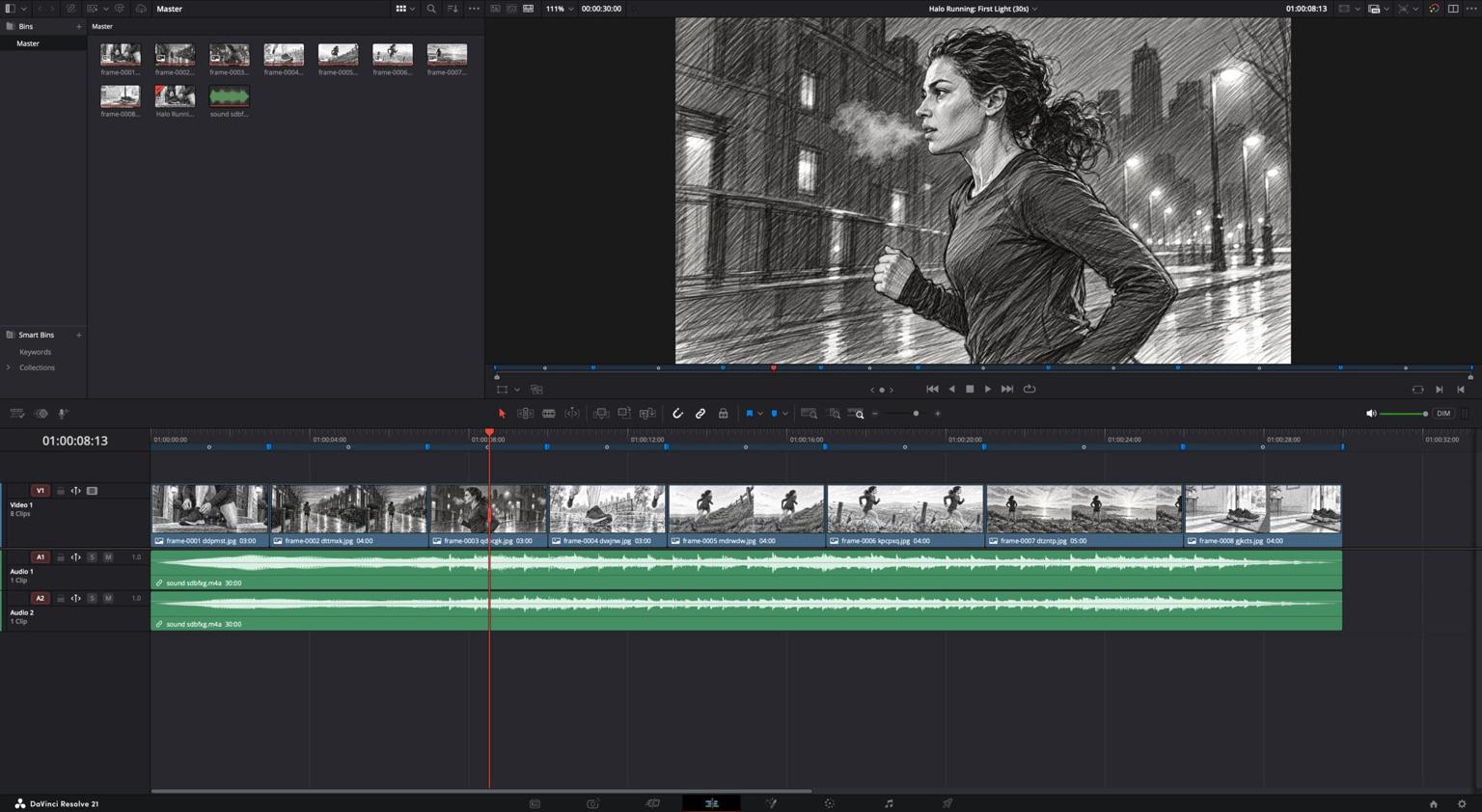
A 25fps timeline, 1920 × 1080 for a 16:9 board, with each frame as a still clip on V1 and your soundtrack, if the board has one, on the audio tracks below.
Into Resolve in four steps
Adding the folder to Media Storage first saves a cancelled import on the Mac App Store version.
Step 1: Export from Boords
Choose Export, then Premiere / Resolve, then Download XML timeline. Boords emails you a link to the ZIP, and the link works for 24 hours.Step 2: Add the folder to Media Storage
Unzip the download. On the Media page, right-click in Media Storage, choose Add New Location and pick the folder that holds it. The Mac App Store version of Resolve only lets you pick folders listed there.Step 3: Import the timeline
In a new, empty project, choose File > Import > Timeline and pick the .xml file. Leave “Automatically import source clips into media pool” turned on.Step 4: Point Resolve at the folder
When Resolve asks whether to search another folder, click Yes and choose the unzipped folder itself.
Labels and notes live on the markers
Resolve names each clip after its image file, so every frame carries a marker with its number, label and notes. Here are the markers from the demo board.
Frame 1: Laces
Starts at 01:00:00:00, lasts 00:00:03:00
Sound: VO: Nobody sees the first mile.Action: Porch light on. Hands double-knot the laces. Street still dark behind.
Frame 2: Empty street
Starts at 01:00:03:00, lasts 00:00:04:00
Sound: VO: No crowd. No finish line. Just you and the cold.Action: She sets off down the terrace. Streetlights still on, pavement wet.
Frame 3: Breath
Starts at 01:00:07:00, lasts 00:00:03:00
Sound: VO: Every step is your call.Action: Track alongside. Her breath clouds in the cold air.
Frame 4: Shoe strike
Starts at 01:00:10:00, lasts 00:00:03:00
Sound: VO: Halo Trail. Built for the miles nobody films.Action: Slow motion. Shoe hits the puddle and water sprays. Product hero.
Frame 5: The hill
Starts at 01:00:13:00, lasts 00:00:04:00
Sound: VO: The hill doesn't get easier.Action: Steep path, long climb. She leans in as the sky starts to lift.
Frame 6: Over the top
Starts at 01:00:17:00, lasts 00:00:04:00
Sound: VO: You just get there sooner.Action: Handheld track as she drives over the crest. Fence posts whip past.
Frame 7: First light
Starts at 01:00:21:00, lasts 00:00:05:00
Sound: VO: That's first light.Action: She stops, hands on hips. Sun breaks over the bay. Music swells.
Frame 8: End card
Starts at 01:00:26:00, lasts 00:00:04:00
Sound: VO: Halo Running. Get there first.Action: Muddy shoes on the doormat. Super: Halo logo and 'Get there first' on the left.
One ZIP for Resolve and Premiere Pro
The same download opens in either editor. Every file name ends in a code unique to that download, so Resolve never links a file from an earlier export by mistake.
What's in the ZIP
- Halo_
Running__ First_ Light__ 30s_ - Halo_
Running__ First_ Light__ 30s_ .xmlThe timeline you import The timeline you import
- frame-0001 ddpmst.jpgOne JPG per frame, sized to the timeline
One JPG per frame, sized to the timeline
- frame-0002 dttmxk.jpg
- 6 more frames, up to frame-0008 gjkcts.jpg
- sound sdbfxg.m4aIf your storyboard has one
If your storyboard has one
- README.txtImport steps for both editors
Import steps for both editors
- Halo_
Running__ First_ Light__ 30s_ script.txtEvery frame’s label and notes Every frame’s label and notes
Good to know in Resolve
- Soundtrack
- A stereo soundtrack arrives as two mono tracks, both panned to the centre. Pan A1 left and A2 right to hear it in stereo. It's AAC, which Resolve on Linux can't play.
- Aspect ratios
- 16:9, 9:16, 1:1, 4:5, 4:3, 1.85:1 and 2.4:1 each get their own timeline size. Other ratios export at 1920 × 1080.
- Timings
- Frames with no duration last 2 seconds. Frames shorter than one video frame at 25fps are left out.
- Missing images
- A frame whose image couldn't be added shows as a grey “Missing frame” clip.
- A snapshot
- The export is a copy of the board when you click. Export again after it changes.
- Linked files
- The timeline links to the unzipped images and sound, so keep the folder where it is.
Frequently asked questions
Yes. We tested the import in the free DaVinci Resolve from the Mac App Store. The ZIP holds a standard .xml timeline (Final Cut Pro 7 XML), so there's no plugin to install.
The Mac App Store version of Resolve only lets you pick folders listed in Media Storage. Cancel the import, and on the Media page right-click in Media Storage, choose Add New Location and pick the folder that holds the download. Then import the timeline again.
On the Media page, set the Media Storage frame display mode to Individual and add the images to the Media Pool. Then import the timeline again with “Automatically import source clips into media pool” turned off.
The timeline runs at 25fps and takes its size from your storyboard: 1920 × 1080 for 16:9, 1080 × 1920 for 9:16, 1080 × 1080 for 1:1, 1080 × 1350 for 4:5, 1440 × 1080 for 4:3, 1998 × 1080 for 1.85:1 and 2592 × 1080 for 2.4:1. The timecode starts at 01:00:00:00.
On the markers. Each frame has a marker named with its number and label, and the marker notes hold the text from your frame fields. The clips themselves take their image file names.
Yes. One ZIP works in both editors. Boords for Premiere Pro has the Premiere import steps.
Paid plans: Solo, Pro, Team and Agency. It isn't available on Free or during a trial. Compare plans.
Cut from the board the client approved
More ways to connect Boords
All integrations and exports- Premiere ProOpen the approved board as a Premiere Pro sequence, with every frame at its Boords timing and the notes on markers.
- After EffectsOpen your timed frames, notes and soundtrack as an After Effects composition, with no plugin.
- MP4 animaticShow the client the timing and pacing before anything is shot.