Video Brief Template, With Shoot, Animation and UGC Examples

A video brief is the document your client signs before anyone writes the script. Below is a free video brief template you can download as a PDF or copy as a Google Doc, three filled-in examples (a corporate video shoot, an animated explainer and a UGC creator brief), and how each field carries into the script, the storyboard and client review.
It's a creative brief built for video. Every field names a length, a format or a person, so the script, the storyboard and the edit can each be checked against it.
Free Video Brief Template (PDF)
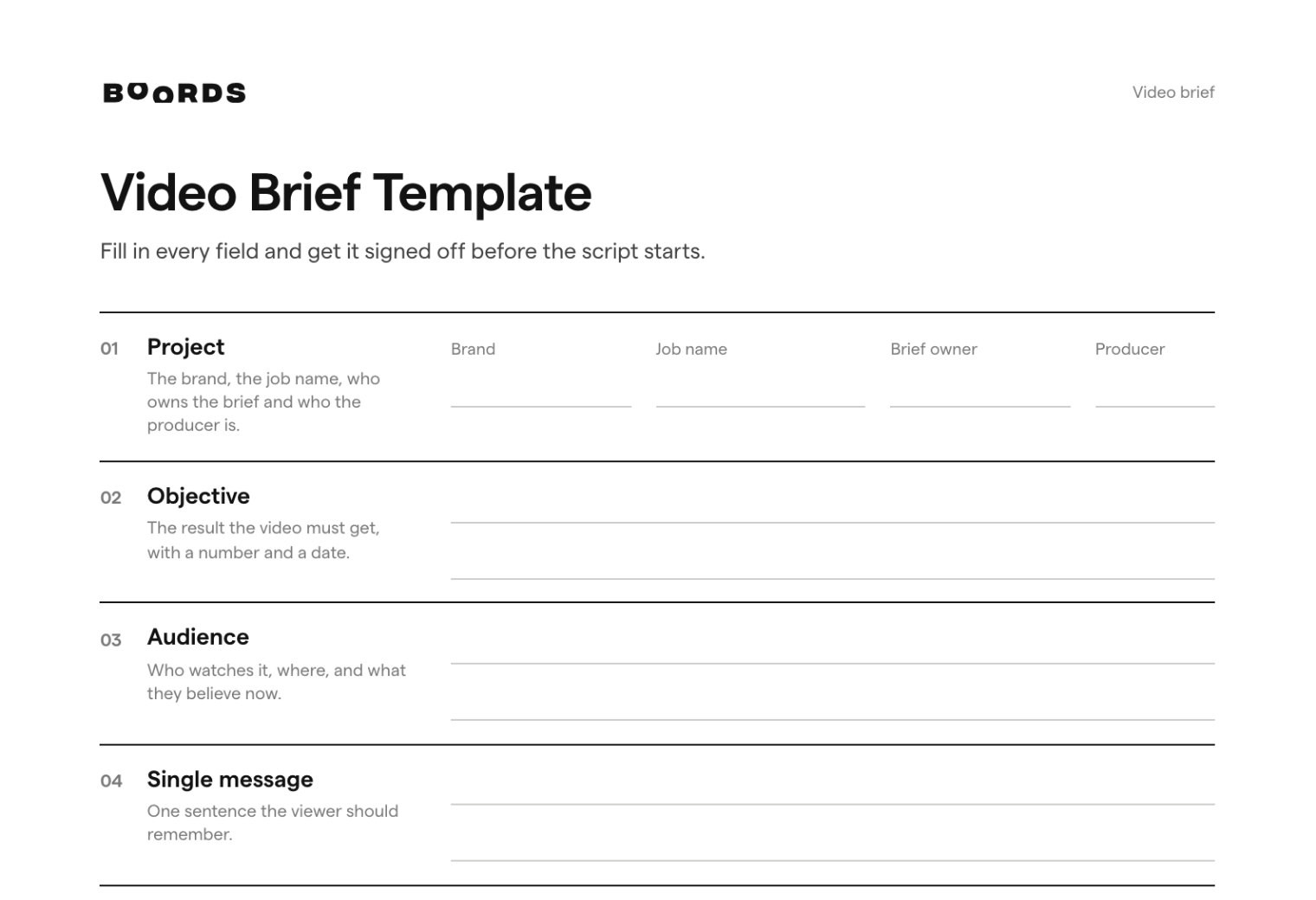
Fields for formats and aspect ratios, named approvers and review rounds, plus a UGC creator brief.
What is a video brief?
A video brief is a one- or two-page document that sets out what a video must achieve, who it's for, the one message it carries, how it will be made, every version that gets delivered, the budget and dates, and who signs off each stage. The production team quotes and writes from it, and the client reviews the script, storyboard and edit against it.
You'll also hear it called a video production brief or a video creative brief. A filming brief (or video shoot brief) is narrower: it's what the crew needs on the shoot day, and it comes after the video brief is agreed. There's a short checklist for one further down.
Video brief template: what to include
| Field | What to write |
|---|---|
| Project | The brand, the job name, who owns the brief and who the producer is. |
| Objective | The result the video must get, with a number and a date. |
| Audience | Who watches it, where, and what they believe now. |
| Single message | One sentence the viewer should remember. |
| Approach | Live action, animation, motion graphics, screen recording or UGC. Who's on camera. |
| Deliverables | Every video by length, aspect ratio and where it runs: the hero and each cutdown. |
| Sound and captions | VO and its word count, music, captions, and whether it has to work with the sound off. |
| Mandatories | End card, logo rules, legal lines, claims, product shots, talent and music limits. |
| References | Videos you like and ones to avoid, and what to take from each. |
| Budget | A figure or range, and what it covers: shoot days, animation, post, music, usage rights. |
| Timeline | Decision dates for the script, storyboard or animatic, shoot, rough cut and final. |
| Approvers | One named person per stage, and who collects everyone's notes into one set. |
| Review rounds | How many rounds each stage includes, and what happens after that. |
Three rows make it a video brief rather than a general one: approach, deliverables by aspect ratio, and sound. They decide how the script is written, how many storyboards you need and what the shoot or animation costs. The last two rows decide when each stage is finished.
Video Brief Template for Google Docs
Make your own copy, fill it in with your client and keep the UGC creator version for social jobs.
Video brief examples
All three brands and everyone named in them are made up. The numbers are realistic but invented. For a 30-second TV ad, a paid social campaign and a brand-side agency brief, see our creative brief examples.
Example 1: a corporate video shoot brief
| Field | Example |
|---|---|
| Project | Corrandale Freight, "Night Shift" recruitment film. Brief owner: Amara Osei, head of talent. Producer: Graham Ellis. |
| Objective | 400 completed applications for warehouse and driver roles at the Columbus and Louisville hubs by the end of March. |
| Audience | Job seekers aged 21-40 within 30 miles of each hub. Most think warehouse work means low pay and no way up. |
| Single message | Start on the floor, and in two years you could run it. |
| Approach | Live action, documentary style. Three real employees filmed on shift. No actors and no scripted lines for the interviewees. |
| Deliverables | 1x 2-minute film (16:9) for the careers page and YouTube. 3x 30s employee cutdowns (9:16 and 1:1) for paid social. 1x 15s (9:16) for job ads. |
| Sound and captions | Interview audio over a light music bed. Captions burned in on every social cut. |
| Shoot | 2 days: Columbus (day and night shift), then Louisville. Signed releases from everyone in shot. Safety vests and hard hats in every floor shot. |
| Mandatories | Real pay ranges on the end card, checked by HR. Logo and "Apply at corrandale.com/careers". No customer brand names on boxes or trailers. |
| References | Two recruitment films for the interview style. One to avoid: too polished, with stock music. |
| Budget | $65,000 for pre-production, 2 shoot days, edit, color and music licensing. |
| Timeline | Interview questions and shot list agreed Jan 16. Shoot Jan 27-28. Rough cut Feb 10. Final Feb 24. Ads live Mar 2. |
| Approvers | Questions and shot list: Amara Osei. Rough and final cut: Amara Osei and Lena Fischer, VP operations. HR checks pay ranges before delivery. |
| Review rounds | One on the questions and shot list, two on the edit. A third edit round is quoted before it starts. |
Why it works: a documentary shoot has no script to approve, so the brief makes the interview questions and the shot list the stage the client signs off, before anyone travels.
Example 2: an animated explainer video brief
| Field | Example |
|---|---|
| Project | Thermwick smart thermostat, 60-second animated explainer. Brief owner: Kenji Mori, product marketing manager. |
| Objective | Lift add-to-cart on the product page from 3.1% to 4% by the end of Q3. |
| Audience | Homeowners aged 30-55 who've heard smart thermostats save money but think fitting one means calling an electrician. |
| Single message | Thermwick fits in 20 minutes with a screwdriver, then learns your schedule on its own. |
| Approach | 2D animation, flat style in brand colors. One recurring character and no dialogue. The VO carries the story. |
| Deliverables | 60s master (16:9) for the product page and YouTube. 20s cutdown (9:16 and 1:1) for paid social. 6s silent loop (1:1) for retail screens. |
| Sound and captions | Professional VO, 140 words at most on the 60s. Music and sound effects. Captions on every version. |
| Mandatories | Product drawn from the CAD files, not from memory. "Works with most 24V systems. Check yours at thermwick.com." on screen for 3 seconds. No savings figures. |
| References | Two explainers for the animation style, plus the brand guidelines. |
| Budget | $32,000, including VO, music and two style frame options. |
| Timeline | Script week 2. Style frames week 3. Storyboard week 4. Animatic week 5. Final animation week 9. |
| Approvers | Script, style frames and storyboard: Kenji Mori. Animatic and final: Kenji Mori and Rosa Delgado, CMO. Legal checks the script and the final. |
| Review rounds | Two on the script, one on style frames, two each on the storyboard and animatic, one on the final. Style changes after the animatic are quoted separately. |
Why it works: in animation the costly changes come after the animatic, so the brief puts the CMO on the animatic, not only the final, and prices any change of style after that point.
Example 3: a UGC creator brief
| Field | Example |
|---|---|
| Project | Kettlebrook cold brew cans, creator videos for paid social. Brief owner: Hannah Webb, social lead. 3 creators, 2 videos each. |
| Objective | Find 2 hooks that beat our best current ad's cost per purchase by the end of August. |
| Audience | Coffee drinkers aged 22-35 who buy iced coffee on the way to work and think canned coffee tastes burnt. |
| Key message | Tastes like your cafe order, for a third of the price. |
| Hooks | Film 3 opening lines from our list and 1 of your own. Show the can or the pour in the first 2 seconds. |
| Must show | Opening the can, pouring over ice, the first sip. The label readable at least once. |
| Don't | Mention other brands. Make health or caffeine claims. Film while driving. |
| Format | 9:16, 20-40 seconds, shot on a phone in natural light. Send the raw clips as well as your edit. |
| Sound and captions | Talk to camera. No licensed music. We add the captions. |
| Usage | One organic post on your account, plus 90 days of paid use on Meta and TikTok from our ad accounts. |
| Fee | $900 per creator, plus product. Paid within 14 days of final approval. |
| Timeline | Concept and hooks agreed Jul 8. Drafts Jul 18. Finals Jul 25. Ads live Jul 29. |
| Approvers | Concept and drafts: Hannah Webb. Tomasz Nowak, legal, checks the drafts for claims. |
| Review rounds | One on the concept, one on the draft. A reshoot is included only if the draft misses the brief. |
Why it works: the usage rights, the fee and what counts as a reshoot are in the brief, so none of them turns into a negotiation after the creator has filmed.
Filming brief: what the crew needs on the day
A filming brief turns the approved script and storyboard into what the crew needs on set. Keep it to one page:
- Locations with addresses, access times and parking.
- Who's on camera, with release forms signed or ready to sign.
- The shot list in shooting order, with the must-get shots marked.
- The aspect ratios to protect for, such as framing 16:9 with a 9:16 safe area.
- On-screen mandatories: logos, products, safety kit.
- Who from the client is on set, and whether they can approve a change there.
Our call sheet template and shot list template cover the rest.
How to write a video brief
- Start from the deliverables. List every video by length, aspect ratio and where it runs. The budget and the schedule follow from that list.
- Ask the approvers what they'd reject. Their answers become the mandatories.
- Pick the approach: live action, animation, UGC or a mix. It decides who's on camera and which review stages the job has.
- Write the single message in one sentence, in plain words.
- Name an approver and a number of rounds for every stage, then get the brief signed off in writing before the script starts.
Named approvers and review rounds
The two rows most video briefs leave out are the ones that decide when a stage is done. Name one person who signs off each stage, and one person who collects everyone's notes into a single set per round. If someone senior will see the final cut, put them on the script and the storyboard too.
Budget the rounds, but don't expect to use them all. In a 2026-10-12 snapshot of Boords data, 86% of the 377 storyboards that went through review were approved without being sent back for a round of changes. Our storyboard approval checklist covers what to agree before a board goes to the client.
From video brief to script, storyboard and client comments in Boords
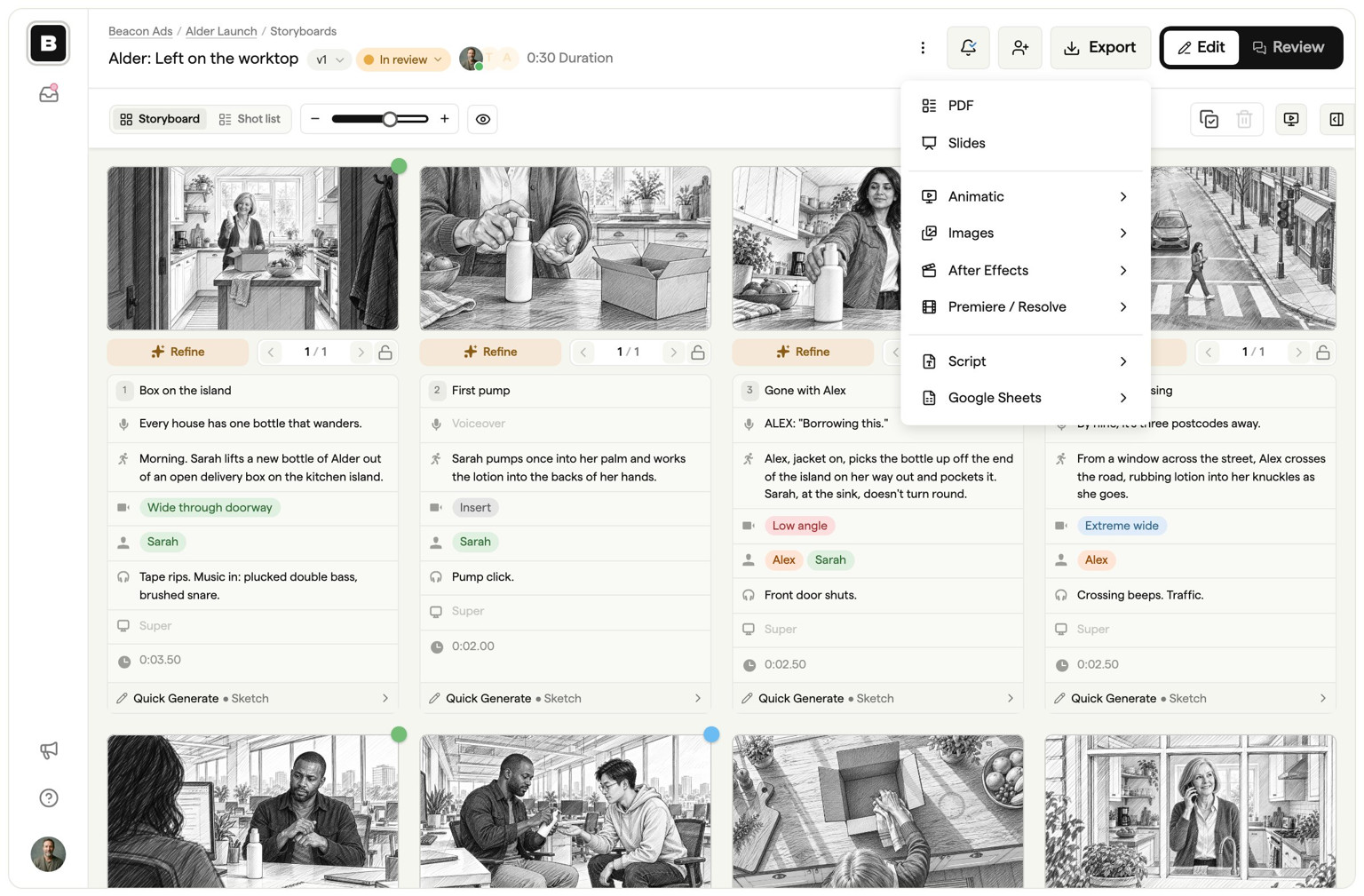
Keep the brief, the script and every storyboard for the job in one Boords project. Each part of the brief has a place to go:
| In the brief | In Boords |
|---|---|
| Project and producer | One project for the job, with the producer added as a team member. |
| Message, approach and sound | The script, written in that project. |
| Deliverables and aspect ratios | One storyboard per format, each with its own frame size. |
| References | Reference stills in the Asset Library, ready to use in any storyboard. |
| Approvers | The first people you send the script's review link to. |
| Review rounds | A status on each script and storyboard, moved by your team after each round. |
Add your producer to the team
- Open the team menu and click Invite members. Or, inside the job's project, click Share, then Invite to edit. Only owners and admins see these options.
- Type the producer's email into Invite by email, choose a role and click Invite.
- Full access lets them edit every project. Admin also lets them manage the team, statuses and projects. On Team and Agency, Restricted limits a freelancer to the projects you assign.
Each teammate takes a seat. Your client never does. Details are in inviting and managing users.
Write the script and send it to the approvers
- In the project, click New, then Script. Write it in Script Editor, or open the Agent tab and use Draft from a brief to paste the brief in for a first draft. The agent needs your team's AI features switched on.
- Click the facepile in the script header to open Share script. Type the approvers named in the brief into Add reviewer emails and send it.
- They select the exact words they mean and comment on them, with no account and no seat. This works on every plan, Free included. On paid plans you can also lock the link with a Passphrase.
Sending from Boords means the Activity panel shows when each approver first opened the script. Free teams keep 3 active scripts at a time, and paid plans have no limit. See script review.
Make one storyboard per format
When the words are agreed, click Storyboard in the script header. In the dialog, set the Frame size for the first deliverable, such as Landscape (16:9), Portrait (9:16), Square (1:1) or Social (4:5), then click Create storyboard. Run it again for each format the brief lists. Each run makes a new storyboard in the same project, and it's a one-off copy, so later script edits don't carry across. More in script to storyboard.
Get the client commenting on the storyboard
- Open the storyboard and click Share storyboard in the header (owners and admins).
- On the Review link tab, check that Allow comments is on. It's on by default for new storyboards.
- Type the same approvers into Add reviewer emails and click Send, or copy the link.
- They open it, enter their name and comment on the frames. They don't need an account and don't take a seat, on any plan.
- When the notes are dealt with, someone on your team moves the storyboard to Approved.
See sharing links for the settings, or client review in Boords for an overview.
Add your producer and freelancers, keep your client a guest
Team gives you 10 seats, and guest reviewers never take one. Give a freelancer access to one project only, and leave team-only comments your client never sees. $125 a month, or $85 a month billed yearly.
Frequently asked questions
What should a video brief include?
The objective, the audience, the single message, the approach (live action, animation or UGC), every deliverable by length and aspect ratio, sound and captions, mandatories, references, the budget and what it covers, decision dates, a named approver for each stage and the number of review rounds.
What's the difference between a video brief and a creative brief?
A video brief is a creative brief for video. It adds the rows a video team needs before it can quote or write: the approach, each deliverable by length and aspect ratio, sound and captions, and the review stages that video has, such as the storyboard, the animatic and the rough cut.
What is a filming brief?
A filming brief, or video shoot brief, is the one-page version of the brief for the crew on the day: locations, who's on camera, the shot list, the aspect ratios to protect for, and who on the client side can approve a change on set. Write it after the video brief, script and storyboard are agreed.
How long should a video brief be?
One to two pages. If it runs longer, it's usually doing the script's job. A UGC creator brief should fit on one page, because the creator reads it on a phone.
Who writes the video brief?
The client usually writes the first version: the marketing or brand lead who owns the result. The producer at the agency or studio then fills in deliverables, budget and dates, and both sides agree it before the script starts.
What should an animation brief include?
Everything in a video brief, plus the style (with references or style frames), how the product must be drawn, the VO word count, and an approver for the animatic. Changes after the animatic cost the most in animation, so say in the brief what happens if the style changes after that point.
How do you write a brief for a UGC creator?
Keep it to one page. Give the key message, the hooks to try, what must be shown, what must never be said, the format and length, the usage rights and how long they last, the fee, the dates, and how many rounds of changes are included before a reshoot.
How many review rounds should a video brief include?
Two per stage (script, storyboard or animatic, and edit) is a common starting point, with one on the final. Write the number into the brief and say what happens after it, for example that further rounds are quoted before they start.
Free Video Brief Template (PDF)
Fields for formats and aspect ratios, named approvers and review rounds, plus a UGC creator brief.
Sharper preproduction, less back-and-forth
Workflow tips and Boords product updates for video and brand teams, twice a week.